MobiFlight Community Support

Welcome to the forum for MobiFlight! Feel free to reach out to the community in case you have questions, issues or just want to share great ideas or details about your latest home cockpit project.

You like MobiFlight? Donate via PayPal and support the MobiFlight development. Thanks! 

05/03/2024 - This forum is read-only

The community support for MobiFlight has moved exclusively over to our Discord server. Register for free and enjoy more interactive functions like image and video upload, voice chat. More than 7,000 registered users around the world make it a great experience!

See you on our MobiFlight Community Discord server.

A HUGE Thank You to everyone who participated in the forum, especially obviously to Pizman and Stephan who did an outstanding job over so many years providing an incredible service to the MobiFlight community.

The forum is still providing a lot of good content, hence we keep this information accessible.

icon
Avatar
Banzai
From: France
Posts: 90
hello
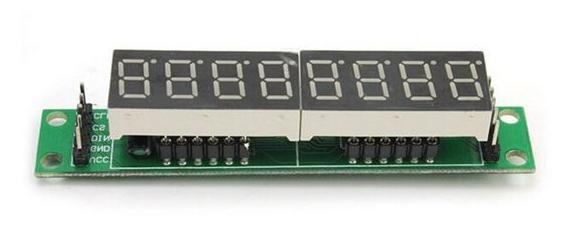
i have two module max 7219 like this
http://arduinolearning.com/wp-content/uploads/2016/10/MAX7219-seven-segment-display.jpg

i want to use this for the mcp b737 with altitude display and vs display
LIKE THIS


it is possible because i have made a panel and i have small place to insert this
thanks
2017-10-28 16:56
Avatar
StephanHo
From: EDDG, Germany
Posts: 1867
Supporter
Hi Banzai,

you can take the digits from the sockets and then connect normally 1: 1 with the board.
This saves the space the PCBs occupy. The cables may be 30-40 cm long without problems.
Grüße,
Stephan (Time: UTC+2)
2017-10-28 17:22
Avatar
Banzai
From: France
Posts: 90
HI
I do that but its wrong nothing appear on the display!
i want to take one digit number for the alt and one for the Vs on the second module on the firts socket
but i dont no if it work separately
2017-10-28 19:59
Avatar
StephanHo
From: EDDG, Germany
Posts: 1867
Supporter
Have you already connected the boards? I do not recognize by your statements what you have already tried.
Have you already worked through the tutorial? How were the results?
Would you like to operate the two boards in series or individually?

If I have understood you correctly, you want from the first board (8 digits) the first 5 digits for Altitude and from the 2. Board 4 places for V / S - right?
Where exactly is your problem? Try to implement the tutorial with only one display. If this works, try V / S.
Or do you have a problem to connect the two boards in series?

En Francais:
As tu déjà connecté les planches? Je ne reconnais pas par vos déclarations ce que tu as déjà essayé.
As tu déjà travaillé à travers le tutoriel? Comment étaient les résultats?
Veux tu faire fonctionner les deux tableaux en série ou individuellement?

Si je tu ai bien compris, veux tu partir du premier tableau (8 chiffres) les 5 premiers chiffres pour l'altitude et du 2. Conseil 4 places pour V / S - non?
Où est exactement ta problème? Essayez d'implémenter le tutoriel avec un seul affichage. Si cela fonctionne, essayez V / S.
Ou as tu un problème pour connecter les deux cartes en série?

Tu peu ecrire ta problem en detail a moi via stephanho@t-online.de
(traduit avec google)
Grüße,
Stephan (Time: UTC+2)
2017-10-28 20:49
Avatar
Banzai
From: France
Posts: 90
yes i have connect all the board
everything is working with mobiflight and arduino with my prototype mcp B737
i have four board chained and this work perfect
but now i want to build my final mcp with a panel homemade.

there was no problem with the display CRS HDG SPEED
but for the ALT an VS it is necessary five digit for each one ( VS have the signal negative also ) it works on y prototype with two board but
i want to take the digits from socket but my panel have no more place to put them i just put tree off them like this


so i want the first and the four digit on the middle module shows the last digit of ALTITUDE and negative sign VS.respectively
the two digits in middle of the module are not use
2017-10-28 22:50
Avatar
pizman82
Moderator
From: ETSI, Germany
Posts: 6010
Supporter
Thats not easy !!

As i wrote in different topics.... A Output Config Use ONE Max7219 Display.....
You can say only use 3 of the 8 diggits.... Thats no Problem... But you can NOT say Use 2 Diggits of Module A and 3 Diggits of Module B for example !

What i recommend....

1. Way...
You use NOT the included 4 Diggit Displays.... You Buy 2x 5 Diggit Displays !
Then You Buy TWO Max7219 Tubes like you describe.
Now you set on EVERY Tube ONE 5 Diggit Display ( Simply let the other 3 Diggits Empty)
Then Module A Include 1x5 Diggit Display for ALT..... And Module B include 1x5 Diggit Display for VS

2. Way....
You SPLIT The Information with a improvisional Double Config.
In Your case there is a simple Logic.... ALT is always 100 or higher.... That means the LAST Diggit is always a ZERO or Blank !
So The first 4 Diggits of ALT are correctly on a 4 Diggit Max Tube Device. Simply use Transform $/10 to get for example a value of 1500 if real value is 15000 ( 15000/10=1500)
....
Now you Need a Second 8 Diggit Tube.
On The Right 5 Diggits you set the VS with a own Config.
NOW You make a additional config for teh LEFT Diggit .
Here the logic must be ALWAYS ZERO. Read a fake offset... For example 0000 and say in Compare If $ = 1 THEN 0 ELSE 0 ..... Now Value is ALWAYS Zero !

****
Summary..... THIS is a improvisional emergency solution.... Normaly this not work so easy.... I High recommend .... ALWAYS plan your Displays so that ONE Config use only ONE Display !
Good Luck !
2017-10-29 01:02
Avatar
StephanHo
From: EDDG, Germany
Posts: 1867
Supporter
What about these ones:

https://www.ebay.com/itm/0-36inch-7-Segment-6-Digit-Common-Cathode-0-36-RED-LED-digital-Display/222260215678?hash=item33bfbdbf7e:g:0v4AAOSwzaJX5g-6
https://www.ebay.com/itm/5Pcs-0-36inch-7-Segment-6-Digit-Common-Cathode-0-36-RED-LED-digital-Display/401194611425?epid=903389412&hash=item5d690ff2e1:g:JbUAAOSwCGVX5fee
https://www.ebay.com/itm/0-36-6-Digit-7-Segment-LED-Display-DIP-Common-Cathode-Red/302325261035?hash=item4663fd62eb:g:9YoAAOSw42JZI7U7

So you have also 12 digits (2 x 6) and can use them each separately. Wiring-diagramm is with the advertisement. So you can configure each board individual.
Pizman recommended you the 5 digit displays but with the 6 digit ones you need not to change your panel layout. An unneeded digit you can then tap off.
Grüße,
Stephan (Time: UTC+2)
2017-10-29 11:51
Avatar
Banzai
From: France
Posts: 90
hi
pizman i test the way two and its fine its works great.
but i think i buy two new display with five or six digits like you recommanded that its better
thanks you very much for your help:thumbup:
2017-10-29 12:42
icon