MobiFlight Community Support

Welcome to the forum for MobiFlight! Feel free to reach out to the community in case you have questions, issues or just want to share great ideas or details about your latest home cockpit project.

You like MobiFlight? Donate via PayPal and support the MobiFlight development. Thanks! 

05/03/2024 - This forum is read-only

The community support for MobiFlight has moved exclusively over to our Discord server. Register for free and enjoy more interactive functions like image and video upload, voice chat. More than 7,000 registered users around the world make it a great experience!

See you on our MobiFlight Community Discord server.

A HUGE Thank You to everyone who participated in the forum, especially obviously to Pizman and Stephan who did an outstanding job over so many years providing an incredible service to the MobiFlight community.

The forum is still providing a lot of good content, hence we keep this information accessible.

icon
Avatar
bar_rodoy
Posts: 27
Hey,
Now when we have the great new LCD features, I wanna suggest a couple of new features.

First, the option to switch between active displays data. If you have used Saitek's Multi or Radio panel, you probably understand that. Lets say I have a 16 x 2 display and I wanna show 4 entries on it. Off course, it is not physically possible. So my idea is to implement an input command that tells the Mobiflight application to switch between the active display entires.

Second, set values as words. For example, when using the PMDG NGX autobrakes values, RTO display as a number (can't remember it right now). My suggestion is to simply tell mobiflight to set a number is a word.

Thanks for this great update, really appreciated!!
2017-10-10 07:06
Avatar
pizman82
Moderator
From: ETSI, Germany
Posts: 6010
Supporter
Hi!

Both is still posible i think....

Please search forum or try out.... If you need help ask here again.
[Last edited by pizman82, 2017-10-10 12:17]
Good Luck !
2017-10-10 12:01
Avatar
karla
Posts: 21
An improvement to assist us when editing and checking is the 'Use preset' drop-down list window under 'Load preset' in the configurations.

It would be useful to retain the chosen entry so that, later when editing or changing or checking, the original entry can be read. Currently it comes up as a blank field and, for example, one cannot check whether one has previously entered 'Radio - COM1 Standby Freq MHz (+) Increase' but can only see offset '0x311A'. A mistake may have been made where '.....(-) Decrease' should have been entered.

I think this applies to 25 fields:
1) Output/Edit/FSUIPC/Load preset/Use preset
2) Inputs/(Button) Edit/Input/On Press etc (two tabs)/Action Type/FSUIPC Offset or Key or Event ID or JeeHell Data Pipe/Load preset/Use preset
2) Inputs/(Encoder) Edit/Input/On Left etc (four tabs)/Action Type/FSUIPC Offset or Key or Event ID or JeeHell Data Pipe/Load preset/Use preset

Nice to have - but easy to fix?? Many thanks.
2017-10-10 20:43
Avatar
pizman82
Moderator
From: ETSI, Germany
Posts: 6010
Supporter
@ Karla....
Sorry i not complettly understand what you mean....

But summary.... i recommend to just forget the "Presets". If you got more advanced after some weeks you not use presets at all. You simply enter your offsets or EventID from the Lists. Please see the "Presets" note like a "tool" This is more like a "Tutorial Example"
I Know thats difficult at beginning.... but there is no other way.... Every user need individual Configs.... A Preset is not realy usefull.... We can support the correct Offset and Size... But the used Value for a input or the Tansform for a output is different for every user....

For exaple If you use a Display instead a Gauge for Output.... Bothl need different Transform/Settings.... So a "Preset" can´t be helpfully for both Systems !
Or if you use a Switch, Button or Encoder for a function.... ALL need different Input Values.

So the "Preset" is just fill up the Offset, Size, Type and Bitmask field.... and that can be done by the user in less then 10 seconds. Simply Do it Youreself !
Good Luck !
2017-10-10 23:50
Avatar
karla
Posts: 21
Hello Mr busy pizman, thanks for the advice and I am now mostly using 'Event IDs' instead of the simplified 'Use presets'.

However, I would still like to repeat my request for the 'Load preset' or 'Use preset' field to retain the displays of selected and entered options. I have been working with MobiFlight for some months now and still see a need for all my entries to be visible when troubleshooting or progressing with development. (I may have it wrong and maybe Windows 10 doesn't display the 'Load preset' fields - even though the 'Event ID' and 'Param' fields are displayed).

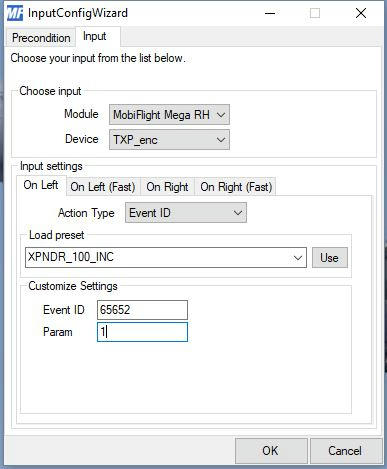
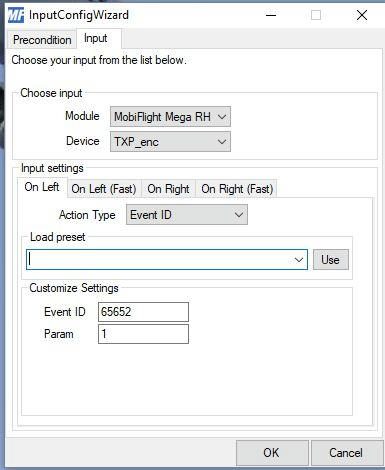
For example, if we enter:- InputConfigWizard / Input / Input settings / Action Type (Event ID) / Load preset / ADD_FUEL_QUANTITY, it would be useful if the 'ADD_FUEL_QUANTITY' was displayed in the 'Load preset' field each time MobiFlight was loaded and this particular tab/page was being checked. So, if one is working on Mobiflight configurations at later dates, one would be able to see what the particular entries were displayed in the 'Load preset' fields. I think that troubleshooting, checking and updating configurations would be easier. In other words: yesterday I configured MobiFlight and today I am checking for errors and I really don't want to remember that a visible value of, say, 65652 in Input settings / Customize Settings / Param was 'XPNDR_100_INC' - I simply want to see 'XPNDR_100_INC' displayed in the - otherwise empty - field.

Thanks again - and many, many thanks for all the effort you guys put into this valuable interface.
2018-01-21 21:25
Avatar
pizman82
Moderator
From: ETSI, Germany
Posts: 6010
Supporter
Hi again....

I understand what you mean.... But i don´t know it this is possible at the moment.... Sebastian must check it himself....

But i must say again.... In EventID its the same situation.....

You use the Preset List in Mobiflight only at beginning. Professional Cockpitbuilders know there needed eventID "by heart" and not need this Preset Dropdown List.
Please Note... THIS List is only for Standard FSX aircrafts ( And 90% of Cockpitbuilders NOT use them) If you work with AddOns this Products use EventID that are NOT on this list.
Finaly if you do this professional you got "own" Lists on paper or in a PDF file where "Your" needed EventID are listed..... so this feature is basicly not needed anymore !

I recommend... If you need a EventID for a element.... NOT use the Preset.... Get a actual List of EventID for your used Aircraft and search for the feature on THAT List.... then simply enter the ID and Parameter by hand in Mobiflight.... So you can be shure 100% you got correct data ( And the missing showing of Preset Name is not longer imporatant)

My result.... For beginners this can be usefull.... but belive in me.... You will not need this after a while !
Good Luck !
2018-01-22 00:46
Avatar
karla
Posts: 21
Thanks pizman82 - I have both an alphabetic list and a numeric list of FSX Event IDs which are well thumbed. I understand how you are trying to help - but my question is still the same:- if an entry is made in a field why not leave it visible for checking or changing later?

My last try at an example:-

Yesterday I entered this -


- but today I see only this -


Originally I meant to enter a transponder increase only in units but mistakenly entered increase in hundreds - and when I reload MobiFlight and check later I only see '65652' - which I am not sure is 'XPNDR_1_INC' or not. OK, I go to my list and check to find that '65652' is 'XPNDR_100_INC' - but if the original entry was retained and still visible I could see my mistake straight away. This applies to FSUIPC presets, Event ID presets, PMDG offsets and any other type of entry.

Thanks for your attention and patience and feel free to close my query if you wish.
2018-01-22 22:28
Avatar
pizman82
Moderator
From: ETSI, Germany
Posts: 6010
Supporter
No Prob.... Maby Sebastian can help you finaly....

I think this a programming problem !

the field you mean ( where you get the name of the Event) is not a textfield! This will NOT show you the Event that is choose in the lower Part with the EventID.... This is like a INPUT Field where you can enter the Event you like to fill in data automaticly for the lower fields.

Maby a compromise would be a additional field between the "Load Preset Input Line" and the "customize setting fields"
Then the Input line is Empty and only use to "choose" a Event for the auto fill function..... the "new" field is programmed to show the Name of the Event id that is currently set in the lower field "EventID"

I think BOTH Systems in one line is not possible..... Then you not know.... Is the shown Name the current Name or the choosen name i like to use from now ?
Good Luck !
2018-01-23 00:06
icon