MobiFlight Community Support

Welcome to the forum for MobiFlight! Feel free to reach out to the community in case you have questions, issues or just want to share great ideas or details about your latest home cockpit project.

You like MobiFlight? Donate via PayPal and support the MobiFlight development. Thanks! 

05/03/2024 - This forum is read-only

The community support for MobiFlight has moved exclusively over to our Discord server. Register for free and enjoy more interactive functions like image and video upload, voice chat. More than 7,000 registered users around the world make it a great experience!

See you on our MobiFlight Community Discord server.

A HUGE Thank You to everyone who participated in the forum, especially obviously to Pizman and Stephan who did an outstanding job over so many years providing an incredible service to the MobiFlight community.

The forum is still providing a lot of good content, hence we keep this information accessible.

icon
Avatar
karla
Posts: 21
INTRODUCTION
I've been into flight sims since MS FS 2.0 and recently discovered Mobiflight's powerful application for interface with FSX; it's just what I want at this stage of my sim career. I've printed and read the Mobiflight manual, the tutorials, YouTube, the forum but still have some problems in getting Mobiflight to work.

QUESTION
My question is fairly simple - what strategy does one adopt in getting Mobiflight to work? I mean, what method should one use in getting an error-free operation?

MY CURRENT METHOD
My method so far has been to, say: construct my panel with LEDs and switches, add firmware to Arduino, install hardware in Mobiflight [Extras/Settings/Modules/Add Device/Pins/Upload etc], configure hardware [Output/Device/Edit/FSUIPC settings/Display/Modules/Test ... Input/Device/Settings etc], Test, Save-As regularly (file number 45 at present). I run FSX and Mobiflight and check operations, stop and maybe re-load Mobiflight, Edit and make changes and re-run. Many times I re-boot the PC and restart Mobiflight and FSX to clean things up.

PROBLEM
My problem often is that after Editing and re-editing configurations the actions don't behave as expected. (I'm not quoting a particular error or giving a log file at this point, if you don't object ...)

At present I am getting FSX readouts for both NAV1 and COM1 active and standby and can change NAV1 stby KHz and MHz - but not COM1 (two weeks ago I could change COM1 but not NAV1). Last week I could swap NAV1/COM1 active and standby readouts; but not this week. I can read and change squawk transponder OK. DME and ADF readouts seem to be OK but I'm leaving refinements on these for later. I can read and change AP-ASI OK. I can read but not change AP-ALT, AP-HDG nor AP-VS (but a few days ago I was changing AP-HDG and AP-ALT).

The point is that I have managed to set up most of the radio stack a bit at a time but I haven't been able to get the complete stack working at the same time. Obviously, some times I must be doing some things correctly but after many hours of checking, re-editing, deleting and re-writing and cross-checking (example - Arduino Tx LED) I am finding progress rather slow.

QUESTION AGAIN
Is there something that I'm missing where I can methodically test each step?
Thanks very much guys.


PROJECT
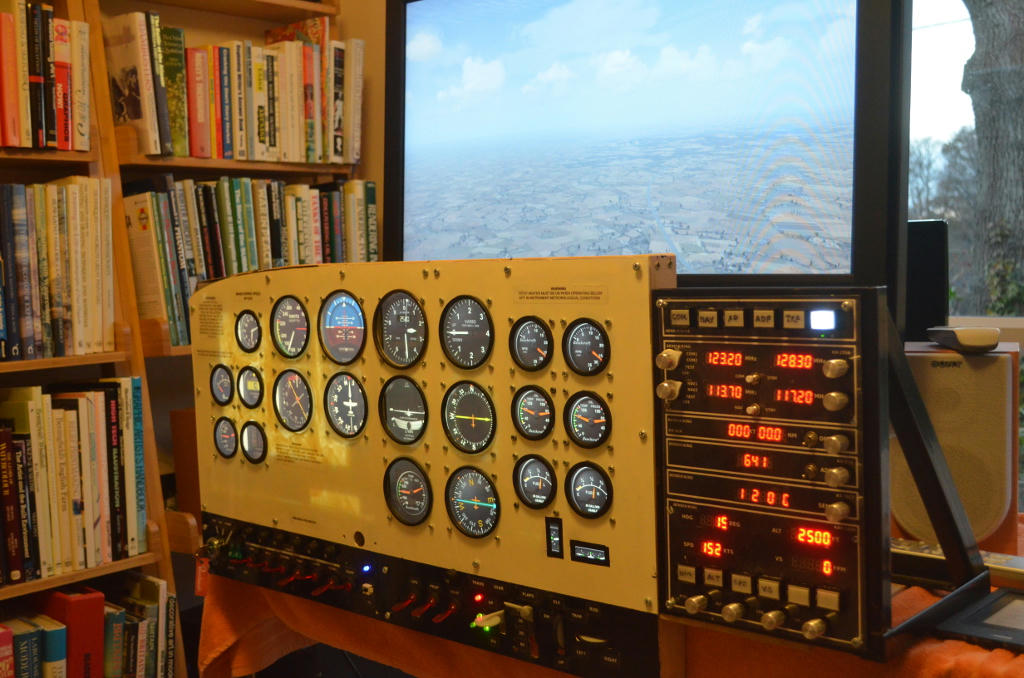
I'm into the second month of constructing a radio stack to bolt onto a generic GA instrument panel with 20x gauges, also well under progress. I currently run FSX SE under Windows 10 and use Arduino/Mobiflight 7.4,0 for the radio stack and will use another Arduino/Mobiflight for the instrument panel switches and controls. I am about to run Air Manager instrument gauges on two monitors under Vista on another cable networked PC. My main inspiration is http://flyingforfun.weebly.com/cessna-172-cockpit.html/#Arduino

The radio stack is a Bendix/King style layout and consists of NAV/COM radios, DME, ADF, squawk and simple autopilot. Here is the hardware setup top to bottom, left to right:

AUDIO
6x square illuminated push buttons for master switching of COM, NAV, DME, ADF, TXP, AP.

COM
11 pin rotary switch set to 4 position for COM1/COM2/test/off selection; 2x MAX7219 7 segment 8 digit LED cut and glued close together to give 16 digit output for COM1 and COM2; KY40 encoder for MHz/KHz adjustment, SPDT switch to select active/standby frequencies.

NAV
Similar to COM

DME
1x MAX7219 LED for DME kts and nm readouts, KY40 encoder for DME selection (readout only for time being, no adjustment)

ADF
1x MAX7219 LED for ADF readout, KY40 encoder for ADF selection (readout only for time being, no adjustment)

TXP
1x MAX7219 LED for transponder readout, KY40 encoder for TXP selection

AP
2x MAX7219 LED for AP heading and altitude, 2x MAX7219 LED for AP speed and vertical speed, 6x square illuminated push buttons for switching of AP, HDG, ALT, SPD, VS and spare, 4x KY40 encoder for adjustment of AP-HDG, AP-ALT, AP-SPD and AP-VS.
2017-09-25 21:31
Avatar
StephanHo
From: EDDG, Germany
Posts: 1867
Supporter
Hi Karla,
welcome to MobiFlight!

The description of your problems is very detailed. I am missing the indication, however, whether you use an Arduino UNO or MEGA 2560 R3 or a derivative thereof.

The problem is that the errors described by you are seemingly dynamic and can not be reproduced by a certain dependency.

Very often after an upload of the configuration to the Arduino do not go the functions just set. This can be remedied by a manual reset of the Arduino board and a stop & go of the MF software (no reboot).

Another question that concerns me is the nature of your construction. Do you work with breadboards or a "flying" wiring or some other provisional equipment or are you already out of the test stage and you are in the final expansion?

As far as the analysis of the errors of your project is concerned, we can start by knowing how the infrastructure of your project is. Because that could be work.

If you were so kind as to answer these questions, we might be able to narrow down the problems.
Grüße,
Stephan (Time: UTC+2)
2017-09-25 22:09
Avatar
karla
Posts: 21
Hello Stephan,

Thank you for the prompt attention. Let's have a look together if you wish.

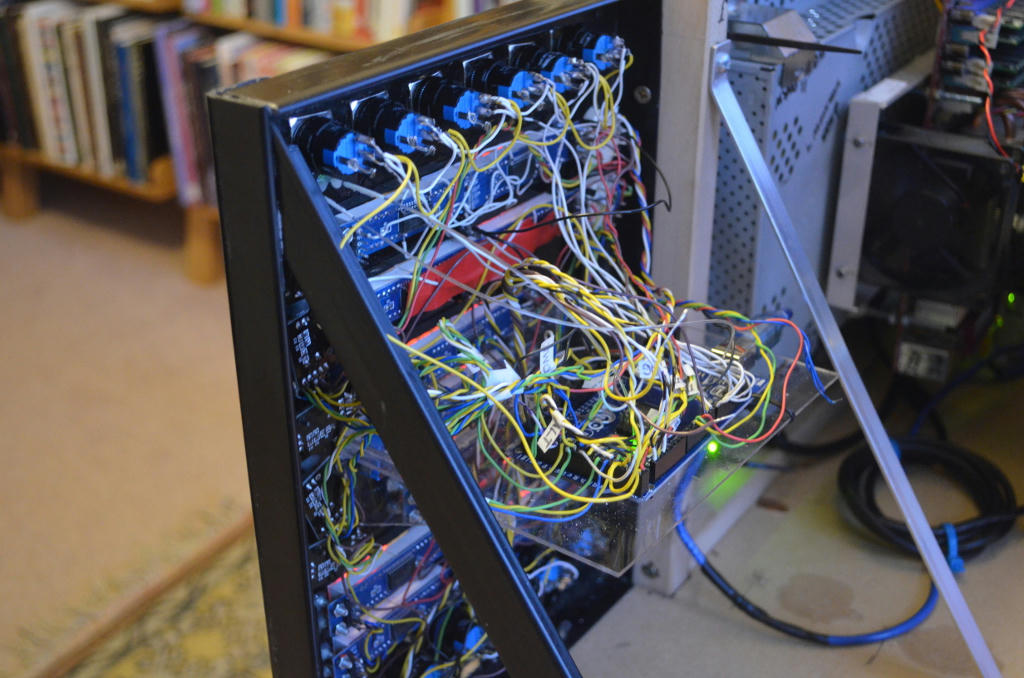
I have a genuine Arduino Mega 2560 R3 and it is mounted on a shelf attached to the rear of my radio stack which itself is ready to mount onto the GA instrument panel. Wiring is soldered onto the LEDs, encoders and switches with the ends of wires twisted, soldered for hardness and cut short to an angle for ease and positive insert into Arduino sockets. These have been checked and re-checked; some were incorrectly numbered (Duh) and one was thin and loose in it's socket (let's assume they're now all OK, otherwise we wouldn't see the Arduino TX LED lighting would we?)

After Edit in Mobiflight and running with FSX SE, I often (not always, but often) stop Mobiflight and reset the Arduino. I sometimes (not often, but sometimes) exit and restart Mobiflight. I think I do these operations enough to clear any possible problems. If necessary, I will stop exit and restart Mobiflight - and reset the Arduino after each Edit.

If it's alright with you, let's have a look at just one current problem - COM1 (NAV1 is working OK).

1. COM1 readout of active and standby is OK; changes in FSX SE changes MAX7219 displays OK.
2. Check on Output/COM1 configuration shows identical to NAV1.
3. Check on Inputs/COM1_stby_button shows identical to NAV1.
4. Check on Inputs/COM1_stby_MHz and KHz shows very similar to NAV1; FSUIPC offsets different of course.
5. Pressing COM1 encoder button lights Arduino TX LED on/off (as does the NAV1 encoder press button).
6. Rotating COM1 encoder lights Arduino TX LED flashing (similar to NAV1 encoder rotation).
7. Extras/Settings/General/ Logging enabled (Warning or Debug modes) shows no activities for COM1 encoder (but OK for NAV1 encoder).
8. I can open .mcc files and maybe use a word processor to look for differences between working and non-working versions, maybe?

That's all I can think of, is there anything else I should check?

Many thanks.
2017-09-25 22:57
Avatar
pizman82
Moderator
From: ETSI, Germany
Posts: 6010
Supporter
Hi Karla... Welcome ! :rolleyes:


IMPORTANT....
I Still research a verry Rare Error for a User from Jarkarta Indonesia..... I Never heard a problem like this and first thought he make a misstake.... But now YOU Report simmular symptoms...... MABY we got a deep bug comming with 7.4 we not see until now.

Please Confirm for me.......
1. Do you use only ONE Arduino for your system OR do you have more Arduinos set same time ?
2. Do you got a Mesasage at Mobiflight Start .... I don´t know the exact term in english version.... In german it says "verwaiste Module laden"..... Maby in English its something like "Load orphaned modules" ..... If Yes Do you accept this message or not ?

Problem here.... This can be a bug... This can be a mistake by user too..... But after twice report in 2 Days we have to research !

***************

About the technics......

I think there is no "official" recommend solution.... But i can tell you MY methode i use since 1,5 years with no big trouble....
1. If you make a FIRMWARE Update ( Whatever you flash a new board or you Patch it to a newer version) ALWAYS make a Arduino Reset
( Use the Reset Button on Arduino.... or if it is still in a element and you can´t reach simply disconnect the USB Cable.... Wait some Seconds and reconnect it.
( And shurly you have to Close and Restart Mobiflight here again cause after reset of Arduino it is not longer shown.... Only boards that connected while startup are listed)

2. After a UPLOAD of a Device ( Not Config... I mean you create a new button for example in /Settings/Devices/Upload ... A Reset of Arduino Board is high recommend too.
But here you NOT must reset the Board after every Entry.... You can set multiple Devices in a Row...... Just RESET it before you first use it for a Config for example.

3. A Restart of Computer is NEVER needed.... A Restart of Simulator is in 99% of cases NOT needed ( Only if FSUIPC Connection is compeltly lost.... But this is just a verry rare bug in FSUIPC.

4. If you Create new Configs or Rework Configs there can exist problems ( in Outputs) This occures for example that a LED not Light up or a 7 Segment Display stay blank or show numbers that not should be shown ( Wrong diggits).
Here a TEST instead of RUN can clear the issue.... But much better is a Restart of Mobiflight ( Only Software... Not the Arduinos)
While Restart the hole Hardware will get reset into a starting State..... That cleanup LED and Display issues. ( Not forget to save youre changes before restart)

******
Some more tips....

A ). I personaly recommend to run Simulator AND Mobiflight both in Admin Mode
B ). I Recommend to always use Up to Date Versions of Mobiflight, FSUIPC and maby used AddOns.

****
My last Tip for your building logic..... Always test in a temporary file.... and if Possible build a Testing Board.
Myself i got a Board with some buttons, Switches, 1xStepper Motor 1x Servo some LED 1 LCD Encoders and Segment Display.
With THIS i check out new stuff.
If i need for example the MCP Displays for a Aircraft i make a new Mobiflight Config File and create 6 Output Configs.... ALL Set to the SAME Display.
( If you not get a testing board simply connect a Display to a new arduino and upload it there,
In the First config i set everything for COURSE LEFT.... In Second for SPD and so on.
To Test i simply activate only ONE Config and check if everything is work fine..... Then i Stop Mobi Reset the Display by Test Button and use Config 2 SPD for testing.....

The Benefit.... With testing board ( or a temporary used Board with this device) you can say there is no other issue in the hardware..... And you not can "kill" something.
Simply "learn" how the config work.... And finaly only insert new configs in your MAIN File if you already know it workes perfectly.... Not use the MAIN file for experiments !

*****
So please awnser my Questions and if you need more information just ask.... We help you !
[Last edited by pizman82, 2017-09-25 23:51]
Good Luck !
2017-09-25 23:45
Avatar
karla
Posts: 21
Hey Stephan,


I may have found a solution.

If NAV1 standby display can be set or changed using Inputs/NAV1_stby_button why not use the same button reconfigured to test and change COM1? I did and it worked. I also tried changing the NAV1 standby frequency with the reconfigured COM1 encoder with no success. It appears that there's a problem with the COM1 standby encoder even though it sends transmission through the Arduino. This may also be the case with three other encoders and two switches.

The problem is probably poor soldering/wiring/linking - or me!

The solution is to find a combination of hardware that works then use just those components suitably configured to troubleshoot the problem areas.

Thanks anyway, I'll work on this over the next week or so and promise to let you know what happens so that we can all learn from my experience.


Best Wishes.
2017-09-25 23:47
Avatar
karla
Posts: 21
Hello pizman,

Sorry I missed your reply before I sent mine. Please don't do any unnecessary research into a 'bug', I will investigate at my end and let you all know what I've learnt in a few days. As you see, I think I have found a better methodology which, although not quite as robust as yours, should help me make some progress. I have read - and will re-read - your advice and tips which are extremely useful for Mobiflight. How about tidying it up a little and posting it as a sticky?

I like your idea of just dealing and proofing one part of the system at a time and combining each in turn into the main file. Is there a relatively easy method of doing this in order to save re-typing and re-selecting options for all the settings?

Your efforts are really appreciated.
2017-09-26 00:11
Avatar
pizman82
Moderator
From: ETSI, Germany
Posts: 6010
Supporter
Not Realy.... Thats bad i know.... a Simply Copy is not possible in Mobiflight.... And just Coppy and paste of code with texteditor is not possible , too. Cuase there are settings of Hardware scripted, too and with other Devices ( In Main Config instead of Test Board) that occure in a error.

But i will say... You just need this at starting. If you get more skill you only need this with verry difficult "new" stuff.... a Simple LED or Button Input can be done if you be shure 100% you still know the system already withouit a test.


***BUT PLEASE***

If you found the Problem in a mistake by yourself everything is fine..... If Not please give me feedback as soon as Possible or simply awnser the qestion now.... Do you work with ONE Board or with multiple Arduinos set to computer same time !
If ONE Arduino then your problem is not what i looking for.... If you have 2 or More Arduinos in use then it can be interesting for the other guys problem !
Good Luck !
2017-09-26 00:27
Avatar
karla
Posts: 21
Hello pizman82, I am currently only using one Arduino board on one PC to run my radio stack. (It was inferred above ..."and will use another Arduino/Mobiflight for the instrument panel switches and controls." ). My second board has not yet been installed but will be used for simple panel switching on the same PC and Air Manager will be used on another PC once I sort out the radio stack setup.

It is unfortunate about no simple copying of configurations to merge tested setups into main file ... but I guess we can quickly re-do settings with experience.

Tonight I've just started methodically testing each item setting hoping to eliminate bad configurations and/or faulty components. As I said, I'll eventually let everyone know what's being going wrong with my system.

Again, many thanks.
2017-09-26 21:29
Avatar
pizman82
Moderator
From: ETSI, Germany
Posts: 6010
Supporter
Hi Again!
Thanks for your Reply.

I now read your postings 3 times and i think i missunderstand you !
You NOT have a problem that a Complete Config get problems after some days of perfect working by itself.
If i understand right you make everytime new configs and test some stuff.... But if you like to combine some features then it not work completly and some things broke.
Maby problem is you wrong implement the old stuff in new config OR you get conflicts in the logic if both Systems should work together.

Now i think your problem is missing of correct Preconditions..... and Pretty shure using of Wrong Offsets.

I recommned.....

1. For FSX ( If you not plan to use Xplane with this config) use simply EVENT ID instead of Offset INPUTS !
Here you not can make misstakes with settings.... The Events work always 100% Correct.

2. Always think about the Precondition logics.
For Example the COM1 MhzKhz Encoder.... Do you have a Dual Shaft Encoder or a Single Shaft ?
For a single Shaft you need a own Custom Logic to switch between KhzMhz. BUt This logic not automaticly work for the NAV switch too....
Only if you write it correct that the nav switch is used too.... Elseway you need again a own logic for NAV switch, too. And again 2 more if you use Nav2 and Com2
Same with COM2/NAV2 .... Here you need for every Switch and Encoder ( Swap AND Inc/Dec Mhz AND Inc/Dec Khz) a Duplicate Config..... All This Configs must be controlled by preconditions. ( Even what function is set ( By your 12 Postion rotary Switch, that function must be controlled by the Inputs)

3. I would recommend to NOT mix up all this stuff at beginning....
Start to Build the COM Panel.... (Not think about NAV)
1.make the Displays working....
2.make the Rotary Switch Working ( To Change C1 C2 )
3. Include the TEST and OFF Settings for the Displays.
4. Make the Swap Button Working for C1
5. Make the Swap button simmular working for C2 with correct Precondition
6. Make The Encoder working for C1
7. Now Make the Same Encoder working simmular for C2... again with right Preconditions
IF ALL THIS is working correct in ONE Config SAME TIME ! Then Save it and backup this File duplicate on a other folder, !

NOW Beginn wioth Nav1 in same technic ( Directly in this File)
If this Work too ( And Com1 already work) you got it.... If Not simply rework it or if completly broke simply load your backup with the running COM System and start again.

Maby Try to build COM and NAV same time is confusing and you mix up some things !

****

Finaly..... If you need Help you can give me a not working file and i can check it for you.... Email pizman@freenet.de
Please use "Mobiflight - karla" in the header to not get in Spam Filter. Add the MCC File !
AND... Explane much detaiied as possible WHAT exactly not work or what is the problem in the config you transmit.!

Have Fun !
Good Luck !
2017-09-27 00:50
Avatar
karla
Posts: 21
Hello pizman, thanks for the detailed replies - they form the basis of an updated guide to installing Mobiflight.

My problems have recently been overcome but not fully understood. I guess the lesson is to proceed a step at a time, one device at a time; my error was to install 35 devices and wiring all in one stage.

After further troubleshooting and replacing two encoders, I realised that there were no faults with the devices - nor soldering errors. I therefore removed the wiring of all the non-working devices from the Arduino and also removed the entries from Mobiflight.

I then methodically re-wired each device, re-installed, configured and tested with FSX - saving files after configuration and testing. Mobiflight was stopped and the Arduino was reset at each stage. I have now working COM1, NAV1 and TXP with encoders; DME, ADF are reading out; autopilot HDG, ALT, SPD and VS are being controlled with encoders. COM1 and NAV1 can be switched between standby and active and I am currently installing a rotary switch for COM1/NAV1 and COM2/NAV2 switching. Then I'm going to create master switches for the sub-systems - and I'm going to carry it out ONE-STEP-AT-A-TIME with FSX testing and file saving at each stage.

I've just made a small donation, thanks again to the team.
2017-09-28 18:26
Avatar
karla
Posts: 21


Just an update to my GA panel project. It was completed two months ago with radio stack as described, two flat screen 17" monitors and dedicated stripped-down PC with Air Manager driving 23 gauges, a second Arduino and Mobiflight driving one key switch, 13 toggle switches, 4 LEDs and 4 encoders.

I dismantled and scrapped the instrument panel last week because the thing was too cumbersome and too heavy to keep moving from store to study. I aim to construct a more compact, modular panel with - radio stack, switch box and single 19" monitor instrument panel. I will then be able to use the whole kit together for extended sorties or use, say, just the switch box or radio stack for a quick session.

Further to message #6194, I was able to use free XML CopyEditor to remove the MobiFlight settings in the .mcc file associated with the redundant Arduino, leaving a configuration that controls the remaining radio stack. Anyway, on with the next project ...
2018-01-20 15:17
icon