The touchscreen is made by a company called
Nextion, AKA
itead. It looks like they want to be a big player in industrial machine control panels, so don't let some of their products/pricing confuse you;
i.e. - Enhanced Support Tickets – 25 Pack $2,000.00.
But they also sell other common things such as touchscreens & Arduinos.
The really BIG game changer is the relatively cheap
Nextion HMI Touch Displays. Some of these sell for about the same price
(or even a little cheaper) as a Raspberry Pi touch display.
These displays will let you create your own individual instrument panels like the Saitek Flight Instrument Panel. And a whole lot more, if you want.
What they
won't do is turn a larger monitor into a large group of instruments. But
they will let you put instruments in places that a full size monitor won't fit. Just take a look at real cockpits. You know that you can't squeeze in some instruments where they really belong.
These screens also won't let you display images from your computer, so forget about interactive GPS or maps.
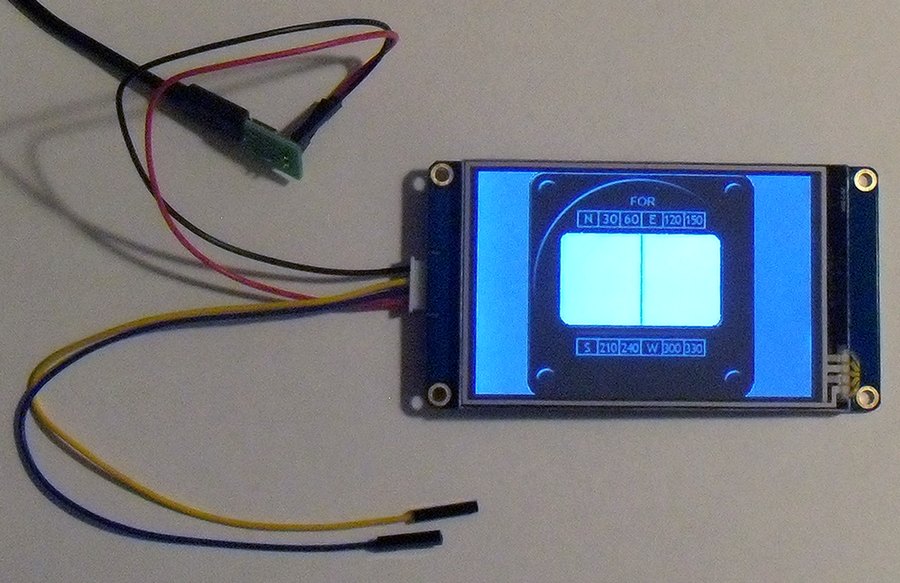
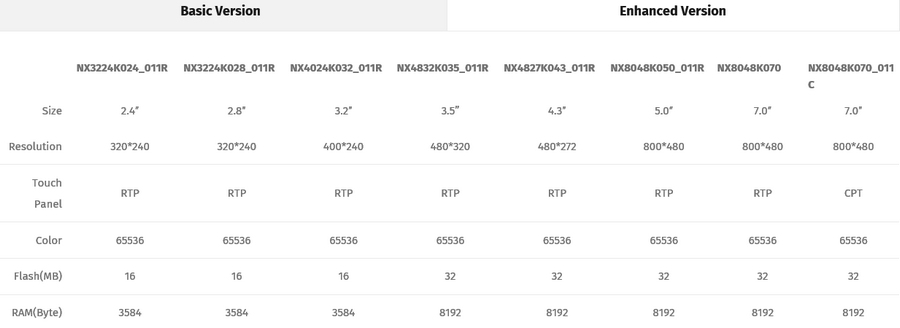
Nextion NX4832T035 - Generic 3.5" HMI LCD Touch Display16MB Flash US $35.99
(Base image from Air Manager V2)
 What's the "BIG Deal" here?
These HMI Touch Displays have MORE power built into the display than a Raspberry Pi 3.
Steps to creating the "display interface" part of the display.
*
What's the "BIG Deal" here?
These HMI Touch Displays have MORE power built into the display than a Raspberry Pi 3.
Steps to creating the "display interface" part of the display.
* You create the "picture" using anything from PowerPoint to your favorite draw program.
* Import the .png image into the free
Nextion Editor.
* Use the Nextion Editor to bring it to life
(tell it what to do).
* Save it to a micro SD card, plug the card into the display, recycle the display to load it into memory
AS A PROGRAM.
And there you have it - an interactive input/output display.
Well, that's the short version.
To interact with your favorite flight sim you need to have it send, or receive, the info trough the 2 I/O wires.
Two I/O wires? Yeah. There are only 4 wires. Total. Two for power, and two for data.
The big advantage is that your computer isn't getting tied up refreshing a display like it has to do with the Saitek Flight Instrument Panels. All of the "action" is controlled by the display.
In the end, you'll need a way to send the data. It can be from an Arduino, or the more expensive Raspberry Pi.
But either one will also let you use physical buttons, switches, and encoders too so it's a win-win situation.
This creates a whole new option for those that want just a few instruments like myself, or those who want a full cockpit. You're no longer tied to using a full size monitor for all of your instruments.
These will let you have good looking, and very animated instruments, with the least amount of effort.
Here's a pretty good video of what you have to do. -
https://www.youtube.com/watch?v=sjWwVs3pr9I
As I've said in the past, I'm not a programmer. But if we can get the date from the flight sim then we can create our own instruments and flight controls.
Here's another video for inspiration -
https://www.youtube.com/watch?v=wtXcwcOjaF0


