MobiFlight Community Support

Welcome to the forum for MobiFlight! Feel free to reach out to the community in case you have questions, issues or just want to share great ideas or details about your latest home cockpit project.

You like MobiFlight? Donate via PayPal and support the MobiFlight development. Thanks! 

05/03/2024 - This forum is read-only

The community support for MobiFlight has moved exclusively over to our Discord server. Register for free and enjoy more interactive functions like image and video upload, voice chat. More than 7,000 registered users around the world make it a great experience!

See you on our MobiFlight Community Discord server.

A HUGE Thank You to everyone who participated in the forum, especially obviously to Pizman and Stephan who did an outstanding job over so many years providing an incredible service to the MobiFlight community.

The forum is still providing a lot of good content, hence we keep this information accessible.

icon
Avatar
ktounsi
Posts: 37
Hello guys
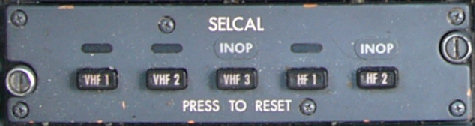
I took a look today in the pete dawson's list offsets and i had remark that there is missing offsets especialy in the control stand section concerning the selcal lights and mic selector lights too.
I tried also to set up the selcal buttons using events (70444, 70445, 70446, 70569 and 70570) but it doesn't work.
Any idea?
2017-09-09 21:21
Avatar
StephanHo
From: EDDG, Germany
Posts: 1867
Supporter
Hello ktousi,

may it be that you mix two aircrafts? Standard aircraft (FSUIPC) and PMDG?
Your EventIDs 70444, 45, 46, 569 and 70 are from the PMDG 737 NGX
If you use this EventIDs with the Standard aircraft, it won't work. If you use the PMDG and they don't work, please check your config.
Maybe that you use as parameter the 0 or the 1 that don't work? Then try as parameter the left mouse button parameter (536870912).
Grüße,
Stephan (Time: UTC+2)
2017-09-10 00:13
Avatar
ktounsi
Posts: 37
Hi Stephan
I'am using the 737 Ngx and parameters
536870912 for push and 131072 for release as you said but nothing happened.

What about selcal's and mic selectors' s offsets (leds)?.

Kamal
2017-09-10 11:15
Avatar
StephanHo
From: EDDG, Germany
Posts: 1867
Supporter
Did you try Offset 0x65E2?
Grüße,
Stephan (Time: UTC+2)
2017-09-10 13:45
Avatar
ktounsi
Posts: 37
Hi Stephane

Well noted.many thanx.
What about the selcal's led offset?

Kamal
2017-09-10 20:14
Avatar
StephanHo
From: EDDG, Germany
Posts: 1867
Supporter
Hi Kamal,

0x65E2 is the Offset you are looking for. You can switch the LEDs with the parameters of this Offset.
Look in your ...\fsx\modules\DSUIPC Documents -folder. There you will find the offset-list.
Grüße,
Stephan (Time: UTC+2)
2017-09-10 22:45
Avatar
ktounsi
Posts: 37
Hi Stephan

65E2 works fine. Many thanx.

Kamal
2017-09-11 00:46
Avatar
pizman82
Moderator
From: ETSI, Germany
Posts: 6010
Supporter
Hi Guys

I Think you talk about 2 dfferent things...
65E2 is for the MIC Selctors ( 3 Bytes ... Each one for CPT / FO and the Standby Radio)


******

What Kamal request, too is the Selcal...


Her i "think" PMDG NOT support the Data for the LED. I know this sucks.... But we need to accept... PMDG is not build for Homecockpiots primary. So not 100% is working.
( By the way... Normaly the Input Events you quote should work for the Buttons.... i not try out but if they are on list they should work normaly !... Output is non existing as i said )

BUT... We can use a provisional solution here.... The SelCal is NOT simulated at all.... The the LED in virtual Cockpit are still Dummys !
If you like i can help you to build a "internal" solution so the LED work like in a Real Plane...... There we not need to talk with PMDG.... We Simply build this internal in Mobilfight!

If YES i need some information how it should look like and work. I Not get PMDG on PC at the moment so you have to find out this for me.... Then i will guide you !
Good Luck !
2017-09-11 13:55
Avatar
ktounsi
Posts: 37
Hello

Pizman82, that's exactly what i am looking for.

Concerning the mic selec, i am in the right way. I set up the red leds with the offset 65E2 and all the switches. but my question : is there an offset for the white led inside the push-pull potar (vhf1,vhf2,vhf3,......,spkr)?.

Concerning the selcal, i don't have any idea how it works and how the leds works. I will make some research and ask a friend of mine who work as a 737-800 captain and i will let you know asap.

Thanx again for your help.

Kamal
2017-09-12 00:59
Avatar
pizman82
Moderator
From: ETSI, Germany
Posts: 6010
Supporter
The white buttons not Work !
They not work in the Simulator, too. ( Only As a dummy for the optics)
Here it´s simply a Problem that this is a function that is not need in a (Virtual) simulator..... If i´m right, The Buttons only controll the the speaker in the cockpit.
So the Pilot normaly got his headset and work with it.... With this buttons he can additional set one (or more) Audio Chanels to the Speakers in the Cockpit.....
In FSX (and i think all other Sims) the System only use the Windows Audio Chanel for ALL Sounds.... That mean it is technical not possible to set different channels to a speaker and a headset chanel.....

What you can do here....

For the realistic Optical Part you can use "Dummys", too. There you not need a Connection to the Sim.... If you Pull/Push a button it´s no matter if the virtual PMDG Button is ON, too.
Simply wire a White LED behind the Button and controll it with the Button Itself. (No Arduino is needed.... Only a Power/GRD.
Additional you can simulate the Speaker improvisional..... For example you can set a Speaker to your PC..... And Cut the cable and set it to ONE of the Buttons (VHF1 for example) .
Then the Cockpit Speaker is normaly OFF.... If you pull the VHF1 Button you close the switch so the Speaker in Cockpit work and sounds the same Chanel like you hear on the Headset..... Not Perfect but then its a working switch that control a real function.

****
About Selcal....

I just check this on a friends PC.... I see the Virtual Buttons in PMDG have a "click-spot" BUT they not work and can not used..... MABY this is a Old feature that is resived from PMDG or that was a future premade that never been finished.... OR This System must be activate in the Options somewhere.
So i can not check out how this should work/ look like.
But again... Simply tell us how you want this work.... Then we made a easy LED Logic that work for you.
Good Luck !
2017-09-12 11:54
icon