MobiFlight Community Support

Welcome to the forum for MobiFlight! Feel free to reach out to the community in case you have questions, issues or just want to share great ideas or details about your latest home cockpit project.

You like MobiFlight? Donate via PayPal and support the MobiFlight development. Thanks! 

05/03/2024 - This forum is read-only

The community support for MobiFlight has moved exclusively over to our Discord server. Register for free and enjoy more interactive functions like image and video upload, voice chat. More than 7,000 registered users around the world make it a great experience!

See you on our MobiFlight Community Discord server.

A HUGE Thank You to everyone who participated in the forum, especially obviously to Pizman and Stephan who did an outstanding job over so many years providing an incredible service to the MobiFlight community.

The forum is still providing a lot of good content, hence we keep this information accessible.

icon
Avatar
Japmaco
Posts: 48
How do u guys show the ADF standby freq properly on your 7 segs? Which offset are u using and other settings with in mobiflight?
Im using the 034C 2 byte with BCD mode for the Active ADF. Now im trying to figure out how to display the standby ADF freq.

Thanks again! Great site
2017-08-06 16:30
Avatar
pizman82
Moderator
From: ETSI, Germany
Posts: 6010
Supporter
iconQuote:


Offset :0284 Size :2 -------ADF1 Standby Frequency: main 3 digits, in Binary Coded
Decimal. A frequency of 1234.5 will have 0x0234 here and
0x0105 in offset 0286.
Ok-SimC Not
possible to
write!

Offset :0286 Size: 2 --------Extended ADF1 Standby Frequency: the high byte contains the
1000’s digit and the low byte the fraction, so, for a frequency of
1234.5 this offset will contain 0x0105.
Ok-SimC Not
possible to
write!



Note these are not writeable.... I never try this out but i think it´s not posible to work with the standby Frequency in FSX (Maby in P3D )
Good Luck !
2017-08-06 16:46
Avatar
Japmaco
Posts: 48
I tried these values. But thats the Main ADF1 Freq. I googled some more and its not possible to display the Standy ADF if not using some stand alone code etc.
Its a shame, so Close to gettting the ADF radio.. just missing the most important part. To see on the 7segs what the encoder is changing.

2017-08-06 18:17
Avatar
pizman82
Moderator
From: ETSI, Germany
Posts: 6010
Supporter
The Problem is, that FSX normaly NOT support this ( i think)

We have some topics here already we talk about. the Radio System is verry old ( from the 80s) and is never be reworked. So your right. If you like a full realistic system you have to improvisional and build the missing elements with own code or some tricky things ( Note it´s posible but need a little more experience in programming)

iconJapmaco:

I Its a shame, so Close to gettting the ADF radio.. just missing the most important part. To see on the 7segs what the encoder is changing.


hhhm. The Problem is, you can not change the Standby Frequence. But i think you can show it ! Maby i need to test out but the quoted Offsets SHOULD BE the Standby Frequence and not the Main Frequence.
Main Frequence is Offset 034C and 0356 !!

*******
Solution:
If you can programming a little bit you can try to make a own system... I Think you only need to write a short code for the SWAP. The Setting and Duplicationg af o Custom Standby System should be posible with Mobiflight. Only the Swap must be done with code.
OR
You use the given System. MABY we can make a solution for you that ios not 100% Perfect.... But better then now and not need own code !

Please give me some time... I will have a look at this. ( Just remeber me if i not awnserd next weeks )
Good Luck !
2017-08-07 09:16
Avatar
StephanHo
From: EDDG, Germany
Posts: 1867
Supporter
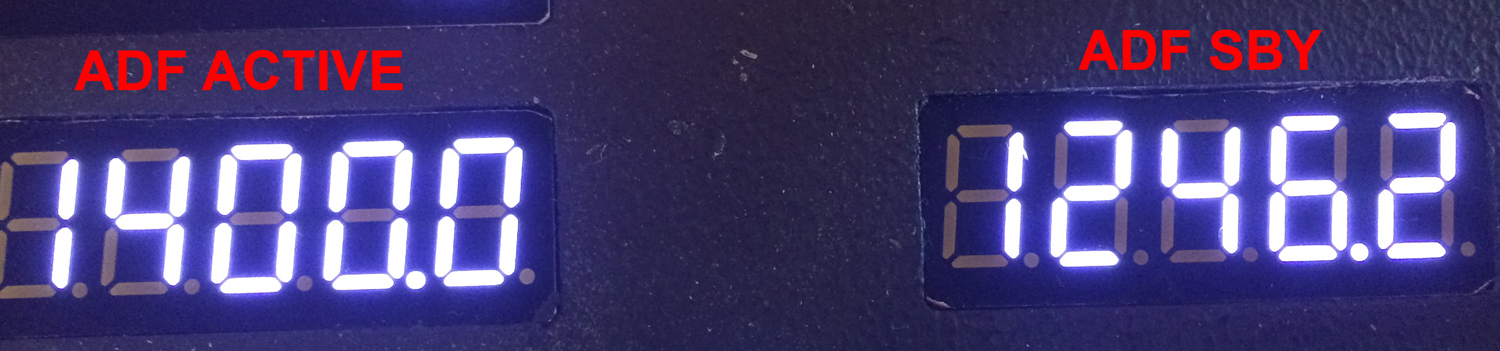
So far as I know the Standby-Frequency of ADF1 can not be changed. It shows only "1400".

I have a Saitek Radio-Panel an there you change the active ADF1-Frequency. But this seems only be possible to generate variables an write them into the offset of the active Frequency to view them.
The offset for the Standby-Frequency of ADF1 is 0x0286. He always shows 1400.

This Theme has been duscussed here https://www.mobiflight.com/forum/message/4982.html
Grüße,
Stephan (Time: UTC+2)
2017-08-07 11:24
Avatar
pizman82
Moderator
From: ETSI, Germany
Posts: 6010
Supporter
Jepp.

I have not foun this topic.... thought it was in english. Whatever !

Again Manipulating of the ADF Standby Offset is not posible in FSX ( The Offset is not writeable and there are no existing EventID for this. ( Only ADF1 Standby SET will change the hole value in one action.... But only availibe with P3D )

My opinion was..... Is it Posible to switch between ADF1 and ADF1 Standby with the EventID " ADF1 RADIO SWAP EventID: 66741"
Maby you can Test it Stephan if This Event toggle the 1400 Standby with the current ADF1 .

If YES we can make a provisional solution.....

Then we can already NOT change the Standby Frequency .... BUT We can "parking" a Frequency there.
So we show both Offsets on 2 Displays.... We can Swap between the Displays.... Only difference is we set with Encoders not the Standby like in Real planes.... we change the Active Frequency !

Example: If we current use xxxxx and need at next yyyy then we push SWAP to park xxxx in the Standby Window.... Then we set with encoders yyyy at the "other" Frequency and after that we push again SWAP to get xxxx back active.
Now we have the same situation like in real System.... ADF1 Active and the decided next Frequency on Standby..... Just need to push SWAP for toggle.

Summary.... This is Optical a good compromise ... Only for short time we make changes we have no working ADF until we toggle back. Not Perfect but maby enough !
Good Luck !
2017-08-07 15:17
Avatar
StephanHo
From: EDDG, Germany
Posts: 1867
Supporter
Hi all,

I can confirm that it is possible to swap the ADF SBY and ADF ACTIVE.

I made four configs:

1. ADF Ttransfer Switch EVENTID 66741 Parameter 536870912 (left Mousebutton)
2. ADF SBY Offset: 0x0284 INT 2 Mask 0xFFFF for x123.y (hundreds, tens and ones)
3. ADF SBY Offset: 0x0286 INT 2 Mask 0xFF00 for 1zzz.y (Thousands)
4. ADF SBY Offset: 0x0286 INT 2 Mask 0x03 for xzzz.1 (decimals)

Evidence:

before swapping


after swapping:


Pizman, now it's on you to change the values ;)
[Last edited by StephanHo, 2017-08-07 19:19]
Grüße,
Stephan (Time: UTC+2)
2017-08-07 18:51
Avatar
pizman82
Moderator
From: ETSI, Germany
Posts: 6010
Supporter
Japmaco.... Sorry for shortly change into german to better comunication with Stephan !

EDIT: By the Way.... Der Parameter dürfte unnötig sein und es müsste auch mit "0" Zero gehen..... Mousecommand braucht es nur bei der PMDG aber nicht bei FSX Events

@ Stephan

Danke fürs testen. Falls du die Config noch aktiv hast kannst du bitte kurz noch testen ob die 1400 wenn sie zu "active" wird tatsächlich editierbar ist.... Und ob dieser Swap danach immer noch geht.....

Also: Ausgangssituation ADF1 Active ist z.b. 1111.1 ADF Stby ist 1400.0
Bitte ändere jetzt mit einen Encoder oder Taster ( Oder Intern im Virtuellen cockpit) die aktive Frequenz... Das sollte ja Problemlos gehen!
DANN Swap bitte mit dem besagten Offset
Wie du auf dem Bild zeigst müsste jetzt 1400.0 aktiv sein und die ehemalige Activ von gerade eben sollte 1:1 jetzt genau so auf Standby stehen.
JETZT die Frage...
kannst du nun mit Encoder bzw im virtuellen cockpit die 1400.0 verändern. ( Ich vermute JA da diese ja jetzt im Endeffekt die AKTIVE ersetzt hat.)
Und die NÄCHSTE Frage...
Kannst du mit einen erneuten Swap bestätigen das die gerade veränderte 1400,0 Frequenz wieder auf Standby ist UND das sie immer noch so verändert ist und nicht wieder auf 1400 zurückgehüpft ist. ??

Ich denke mal schwer das geht alles.

Somit dürfte meine Notbehelf Idee funktionieren. Man verändert zwar damit leider weiterhin nur die Active Frequenz... ABER zumindest hat man eine Sinnvolle Datenwquelle für das Standby Display.... Der Swap Button hat eine Funktion.... Nur der Arbeitsablauf ist halt nicht 100% Richtig und die Encoder steuern halt das falsche Display !

Eine Anderung des Standby halte ich für aktuell nicht möglich über den regulären weg.... Wie du sagst. für ne 1:1 Lösung braucht es zwingend einen eigenen Code der dann gar nicht auf den STBY offset zugreift sondern eine interne Variable verwendet!
Good Luck !
2017-08-07 19:55
Avatar
Japmaco
Posts: 48
2017-08-07 21:40
Avatar
pizman82
Moderator
From: ETSI, Germany
Posts: 6010
Supporter
:confused:

Basicly cool that it work now... BUT Sorry i not understand this !

Some Posts ago you said after i tell you the Standby Offset 0284 the follow ....
iconJapmaco:

I tried these values. But thats the Main ADF1 Freq.


But now in the Video i see you work as i said and use 0284 for standby.
Is it correct the quote statement was simply wrong and the offset was correct all the time ??

*********
But the interesting part.... I see in video you realy be able to controll the Standby Offset... Please tell us HOW do you make this !!
In the FSUIPC Documentation Pete Dawson said this is not posible.
By the Way..... You use FSX or Fs9 ? Maby in FS9 thats different !
Good Luck !
2017-08-08 00:12
Avatar
Japmaco
Posts: 48
https://youtu.be/Ery4Q7EmR9s

check my new video out

This is on P3D V4 in a A2A 172
[Last edited by Japmaco, 2017-08-08 16:25]
2017-08-08 15:55
Avatar
StephanHo
From: EDDG, Germany
Posts: 1867
Supporter
next confirmation:

Settings: ADF1 Active 1111.1, SBY 1400.0
Swapable withe the Encoder Button

Active now: 1400.0, SBY 1111.1
Going to the Cockpit, Shift 4 for Radio-Panel. There swapping the 1400.0 to the SBY-Display (only in the Cockpit). Changing to 938.7 and internal swapping this to the active.
Result: Active 938.7, SBY 1111.1
Now swapping via Encoder-Button (external) : Active 1111.1, SBY 938.7

Therefore possible but circumstantial...

How and with which EventID did Japmaco his swapping do? He also uses the FSUIPC EventIDs and Offsets, didn't he?
Grüße,
Stephan (Time: UTC+2)
2017-08-08 18:04
Avatar
pizman82
Moderator
From: ETSI, Germany
Posts: 6010
Supporter
Video Link ( from second Posting) is broke i think.....

But finaly i will say this is in case of using P3dV4 ..... As Pete Dowson comment himself... FSX is normaly not posible to make this !
( In the EventList there is a special Note on all ADF Standby entrys that it work ONLY with P3D )

So i think we can close this..... Result: Posible with P3D .... With FSX the provisional Solution is a way or a self written Script in LUA.

Thanks for Researching !
Good Luck !
2017-08-09 20:27
Avatar
Japmaco
Posts: 48
Its actually very simple when i found out how thanks to u guys helping out,


Basically. I use 2 set of 7segs for this on my home made radio.

For the ADF STBY
0x0284 2byte in BCD
For the ADF
0x034C 2byte in BCD

And then i just map my dual encoders w/push in fsuipc in p3d to change the values.

Good luck! It works perfect.

(if u still use FSX.. pls.... go to P3D V4) Amazing sim now.
2017-08-09 22:29
Avatar
pizman82
Moderator
From: ETSI, Germany
Posts: 6010
Supporter
Japmaco...
Sorry i refres this again....

What Stephan and me are need is the Information for the Input.... The Output to 7 Segment is no problem for us in FSX, too.

iconJapmaco:


Its actually very simple when i found out how
....
And then i just map my dual encoders w/push in fsuipc in p3d to change the values.


THATS the Part we need to know. Do you use a FSUIPC Event.... If Yes What Event Number or how it named correct in FSUIPC ??
Good Luck !
2017-08-10 13:17
icon