MobiFlight Community Support

Welcome to the forum for MobiFlight! Feel free to reach out to the community in case you have questions, issues or just want to share great ideas or details about your latest home cockpit project.

You like MobiFlight? Donate via PayPal and support the MobiFlight development. Thanks! 

05/03/2024 - This forum is read-only

The community support for MobiFlight has moved exclusively over to our Discord server. Register for free and enjoy more interactive functions like image and video upload, voice chat. More than 7,000 registered users around the world make it a great experience!

See you on our MobiFlight Community Discord server.

A HUGE Thank You to everyone who participated in the forum, especially obviously to Pizman and Stephan who did an outstanding job over so many years providing an incredible service to the MobiFlight community.

The forum is still providing a lot of good content, hence we keep this information accessible.

icon
Avatar
sim-pc
Posts: 5
Ist es möglich, mit Mobiflight, eine einzelne Led mit dem MAX7219 anzusteuern?
64 Led's die ich ohne zusätzliche Widerstände an einem 7219 hängen könnte, das wäre cool.

Ich könnte z.B. an einem MAX7219 mehrere 7Segmentanzeigen und Led's ansteuern.

******************************

Is it possible, with Mobiflight, to control a single LED with the MAX7219?
64 Led's that I could hang on a 7219 without additional resistors, that would be cool.

For example, I could control several 7-segment displays and LEDs on a MAX7219.

----------
MAX7219 Contollercard
https://www.sim-pc.de/diplaycard/
Gruß Andreas
______________________________________
My Cockpit: http://www.737ng.de/
Hapagfly Boeing 737-8K5 D-AHFC
ICAO: EDDL IATA: DUS. Coordinates. 51.280925°, 6.757311°
2021-06-12 14:21
Avatar
pizman82
Moderator
From: ETSI, Germany
Posts: 6010
Supporter
No, Just very rudimentary!

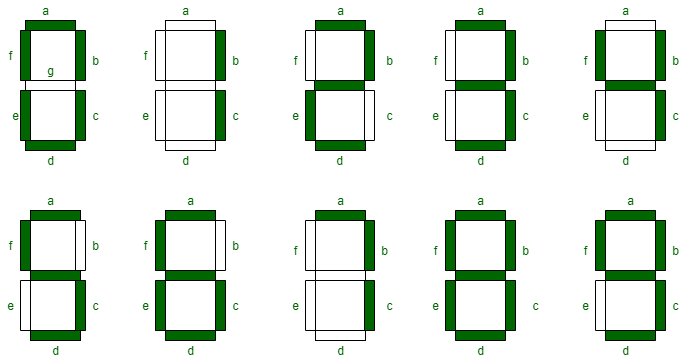
Basically every Segment is a LED .... But MF use for controlling the "Font B Code"
https://datasheets.maximintegrated.com/en/ds/MAX7219-MAX7221.pdf (Page 7 and 8 for further Info)

To controll each LED individually MF would need to send a code that include simply a "1" or "0" for every single segment (64 bit) .
BUT we just send a code that say "please write e.g. "5" on digit adress "0" .... So the MaxChip itself define a "5" need to light Seg A,C,D,F,G ....

The only way to tricky solve this at the moment is to handle only 2 ( maybe more difficult 3 i think) LED on each Diggit.....


Lets say we wire the 2 LED.... One on Seg F the other on Seg E
If Mobiflight show a "1" then both are OFF ..... If Mobiflight send "0" both would be ON .... If MF send "5" then F is ON and E is OFF ..... If MF send "2" then F is OFF and E is ON.
So we create a posibility to set the Output into 4 different states (1,0,5,2) and can handle all 4 possible Siutuations ( 00,01,10,11 )

To build this with 3 LED the System get much much more difficult ! The All OFF can be done with a "Space"...: The All ON can be done with a "8" .
BUT do you find a combination for "001,010,100,110,011,101" ??? So 6 individual "numbers or symbols" that occure in that LED Combinations ??

****
You see..... Not verry usefull for now.

And we also not plan for this..... Same way with Multiplexer, Matrix and all this stuff.
If you need 400 LED simply use 10 Megas with 40 individual Pins each. Its NOT our target to save Pins or to reduce Number of Megas. User can build cockpits in theory with hundrets of Arduinos..... So we think there is no need to increase difficult just to save pins. Apollogy if you expect a other awnser :rolleyes:
Good Luck !
2021-06-12 15:39
Avatar
sim-pc
Posts: 5
Das ansteuern der einzelnen Segmente ist nicht das Problem aber ich hätte es natürlich gerne im Mobiflight. Eben alles aus einer Hand.
Hier ein Beispiel in welchem ich hintereinander 4 Einzelne Bereiche in den Anzeigen ansteuere.

Controlling the individual segments is not the problem, but of course I would like to have it in the Mobiflight. Everything from a single source.
Here is an example in which I control 4 individual areas in the displays one after the other.

Video
https://youtu.be/DhSx7qKyOxQ

iconCode:
// Arduino Mega2560 with MAX7219
#include <LedControl.h> // Library for LED control with MAX72XX * http://wayoda.github.io/LedControl/index.html

const byte pinMOSI = 2; // is connected to DataIn (DIN)
const byte pinCLK = 3;  // is connected to CLK (CLK)
const byte pinCS = 4;   // is connected to LOAD (CS)

//LedControl(dataPin,clockPin,csPin,numDevices)
LedControl lc = LedControl(pinMOSI, pinCLK, pinCS, 1); // MOSI, CLK, CS, number of device
bool state = true;

void setup() {
  lc.shutdown(0, false);  // The MAX72XX is in power-saving mode on startup, we have to do a wakeup call
  lc.setIntensity(0, 1);  // Set the brightness of display between 0 and 15
  lc.clearDisplay(0);     // Clear the display
  lc.setScanLimit(0, 3);
}

void loop() {
    for(int i=0;i<4;i++)  {
    lc.setLed(0, i, 1, state);    // Digit.0 to Digit.3 + Seg.A
    delay(500);
    }
    lc.clearDisplay(0); 
    delay(500);
    for(int i=0;i<8;i++)  {
    lc.setLed(0, 0, i, state);    // Digit.0 all Seg
    delay(500);    
    }
    lc.clearDisplay(0);   
    delay(500);
    for(int i=0;i<4;i++)  {
    lc.setLed(0, i, 7, state);    // Digit.0 to Digit.3 + Seg.G
    delay(500);
    }
    lc.clearDisplay(0); 
    delay(500);
    for(int i=0;i<8;i++)  {
    lc.setLed(0, 2, i, state);    // Digit.2 all Seg
    delay(500);
    }
    lc.clearDisplay(0); 
    delay(500);
    for(int i=0;i<4;i++)  {
    lc.setLed(0, i, 4, state);    // Digit.0 to Digit.3 + Seg.D
    delay(500);
    }
    lc.clearDisplay(0); 
    delay(500);
}


Hier als Video
https://youtu.be/DhSx7qKyOxQ
Gruß Andreas
______________________________________
My Cockpit: http://www.737ng.de/
Hapagfly Boeing 737-8K5 D-AHFC
ICAO: EDDL IATA: DUS. Coordinates. 51.280925°, 6.757311°
2021-06-12 17:29
icon