MobiFlight Community Support

Welcome to the forum for MobiFlight! Feel free to reach out to the community in case you have questions, issues or just want to share great ideas or details about your latest home cockpit project.

You like MobiFlight? Donate via PayPal and support the MobiFlight development. Thanks! 

05/03/2024 - This forum is read-only

The community support for MobiFlight has moved exclusively over to our Discord server. Register for free and enjoy more interactive functions like image and video upload, voice chat. More than 7,000 registered users around the world make it a great experience!

See you on our MobiFlight Community Discord server.

A HUGE Thank You to everyone who participated in the forum, especially obviously to Pizman and Stephan who did an outstanding job over so many years providing an incredible service to the MobiFlight community.

The forum is still providing a lot of good content, hence we keep this information accessible.

icon
Avatar
bennnozgurum
Posts: 58
Hi Dear Mobiflight Community :)...

First of all, thank you very much for LCD Display support with 7.4.0 version. I make it work without any problem, however the only problem that I have is:

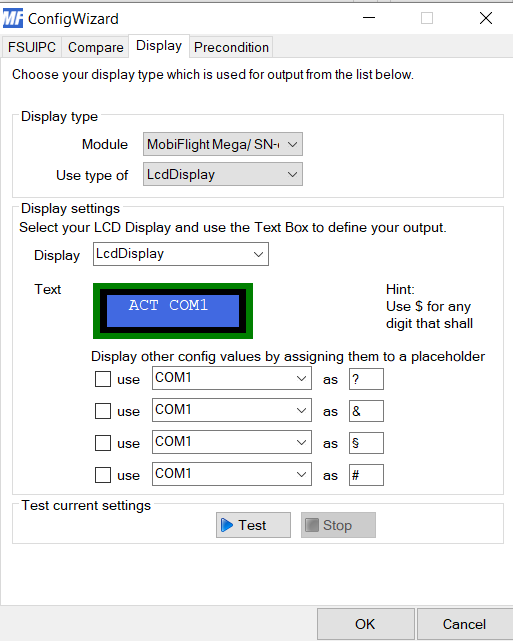
I adjust all the things in this window.

And I save all my settings to a file.
But it resets everything in this window again.


I tried opening the mobiflight in admin mode but nothing changed.

Can you help me? What can I do?
2017-12-17 13:36
Avatar
StephanHo
From: EDDG, Germany
Posts: 1867
Supporter
Hi,

where did you install MobiFlight on your System?

If you did it on C:\ it may be that you can only write there with Admin-permissions.

You have to SAVE your settings as Admin to save them on your drive. The you have to start MF in Admin-mode to be able to read them.

So that you can not forget the admin rights, simply right click on MF, select Properties, go to compatibility and set the checkmark at 'Authorization level' before 'Execute program as administrator'. Confirm with OK and rejoice

Please try again and report your experiences.
Grüße,
Stephan (Time: UTC+2)
2017-12-17 15:16
Avatar
pizman82
Moderator
From: ETSI, Germany
Posts: 6010
Supporter
iconQuote:

And I save all my settings to a file.
But it resets everything in this window again.


HI
What do you mean with save ??

Basicly you have to acept the entrys by clicking "OK" ...
Then you have to save the Config in a MCC File.

Do i understand correct after Reload the settings are gone ??

If yes please try to make a NEW Config.... Only add a Display Output and the needed Readout Configs....
Does it work now ???

I think we need to find out if you make a wrong setting, OR if there is a real problem in your file that not save your settings correct.

And NOTE:
With your current Setting the Display will not show the frequencys..... You only show the Text " ACT COM1 "
If you like to show the values you need to set in the Display field for example "COM1 act: ???.?? - COM1 Stb: $$$.$$ "
Without using the placeholders in that field you only show the written text on the Display !
Good Luck !
2017-12-17 16:00
Avatar
bennnozgurum
Posts: 58
Dear Pizman

Thank you very much for your answer, but you know I am not new for mobiflight. In the picture you don't see all my adjustment about LCD display :)

It is like this.

ACT COM1 STBY
???.?? -- &&&.&&

Of course I adjust it and everything works Ok, However when I close mobi and turn it on again, the adjustment on the picture resets again. The ticks are gone as you see in the attached picture in the first post.

It is not about me, I think there may be someone who has this problem. I tried all the things as you said :)...
2017-12-17 16:44
Avatar
bennnozgurum
Posts: 58
I think you didn't understand my problem. Everything works perfect as you see in the picture:


I close the mobi and turn it again, it shows this.


And of course I know this is because the settings are gone like in this picture:


So everytime when I open mobi, I have to adjust it again...
This is the problem... :)
2017-12-17 17:02
Avatar
pizman82
Moderator
From: ETSI, Germany
Posts: 6010
Supporter
:rolleyes: Özgür, My old friend! ... Sorry i not realy read the user name before. How ar you? Hope all is fine !

***
iconbennnozgurum:


It is not about me, I think there may be someone who has this problem. I tried all the things as you said :)...


iconpizman82:


If yes please try to make a NEW Config.... Only add a Display Output and the needed Readout Configs....
Does it work now ???


Can you confirm you still do this and the problem is exist already ??

Maby this is simmular to the "Interpolation Bug" ... There, some users say they make a checkmark on Interpolation enable.... But after SAVE and RESTART the mark is gone and the function is disabled again. ( Same like yours but on another spot)
In that situation we find out that the problem is gone if they create the 100% identical Configuration in a new file ( without all the other things)
If possible please confirm.... Does it work fine in a NEW Config where only 3 Lines exist ( LCD Output, Readout Nav1ACT , Readout Nav1 Stby)

Aditional you can check another thing.... When you SAVE The file.... please OPEN the mcc with a editor like notepad++ or another one..... Maby you advanced enough to understand the script code..... find the LCD Config part and check if the Settings (for the 2 placeholder) are saved....
Then Reload the File in Mobiflight ( Where the problem now exist) and now check the file again with the editor.

In the "Interpolation Bug" we find out that the code of mcc file is 100% correct all the time in that config..... But Mobiflight (we dont know why) NOT execute the code correct and produce the error. ( It disable the function whatever it must be enable in the code itself)

*****
i will recommend you send me the mcc file ( please make a short note in email what configs are involved.so i not need to search all the file !)
Like always...... Give me some days for reply !

Thank you !
Good Luck !
2017-12-18 10:49
Avatar
decioapn
Posts: 9
Hi, Folks:

After fighting with this issue for a long time, I believe I finally found a fix for it. Comparing two MF different profiles I have, where one display works fine and the other present the errors with '?", "#", etc in place of the desired data, I realized that, in the .MCC file, the value you want to display must be before the display clause, like follows:

THIS IS THE HDG CLAUSE
<config guid="04e8366d-cdb3-4a82-b42a-e92e40ac4310">
<active>true</active>
<description>HDG</description>
<settings msdata:InstanceType="MobiFlight.OutputConfigItem, MFConnector, Version=7.4.0.0, Culture=neutral, PublicKeyToken=null" xmlns:msdata="urn:schemas-microsoft-com:xml-msdata">
<source type="FSUIPC" offset="0x0580" offsetType="Integer" size="4" mask="0xFFFFFFFF" bcdMode="False" />
<comparison active="False" value="" operand="" ifValue="" elseValue="" />
<display type="" serial="-" trigger="normal" pin="" pinBrightness="255" />
<preconditions />
<transformation active="True" expression="$*8.3819E-08" substrStart="0" substrEnd="7" />
<configrefs />
</settings>
</config>

THIS IS THE DISPLAY CLAUSE
<config guid="396c9b75-57ef-4222-9cc5-af0f71ebcd8d">
<active>true</active>
<description>Display test</description>
<settings msdata:InstanceType="MobiFlight.OutputConfigItem, MFConnector, Version=7.4.0.0, Culture=neutral, PublicKeyToken=null" xmlns:msdata="urn:schemas-microsoft-com:xml-msdata">
<source type="FSUIPC" offset="0x3324" offsetType="Integer" size="4" mask="0xFFFFFFFF" bcdMode="True" />
<comparison active="False" value="" operand="" ifValue="" elseValue="" />
<display type="LcdDisplay" serial="LedsOverhead/ SN-5a9-8aa" trigger="normal" address="LcdDisplay">
<line>Alt: $$$$$</line>
<line>HDG: ???</line>
</display>
<preconditions />
<transformation active="False" expression="$" substrStart="0" substrEnd="7" />
<configrefs>
<configref active="True" ref="04e8366d-cdb3-4a82-b42a-e92e40ac4310" placeholder="?" />
<configref active="False" ref="d3488ae6-787a-4b12-a7dd-e5248b7b83ce" placeholder="#" />
<configref active="False" ref="d3488ae6-787a-4b12-a7dd-e5248b7b83ce" placeholder="§" />
<configref active="False" ref="d3488ae6-787a-4b12-a7dd-e5248b7b83ce" placeholder="&" />
</configrefs>
</settings>
</config>

On the aboce example, display will work fine.
However, if in your .MCC file the value you want to display be after the display clause, MF will not be able to show it and you will see the characters like "#", "?", etc.
In order to fix this, carefully open the .MCC file with a programm editor like Notepad++, find the display clause and move it after all the data clauses you want to display.

After realizing it, on new profiles I first include every data I want to display, save the file, and then I set up the display. On this way, I assure the display clause will be the last one in the .MCC file.

Hope it helps and my best regards.

Decio
2018-02-25 05:14
Avatar
bennnozgurum
Posts: 58
Thanks for your answer Decio,

But the problem above is different :( When we put preconditions to show multiple panels like com1, com2, nav1... The ticks in LCD display row are gone away... So it doesn't show when you close and open the save file again... Everytime we have to click and tick to the "?" "&" or whatever are you using. There is no problem if you are not using preconditions...
2018-03-16 12:46
Avatar
pizman82
Moderator
From: ETSI, Germany
Posts: 6010
Supporter
Oohh...
I Still forgot this problem.... Sorry for that,

I need to rethink this and if possible i will add it to our new "important Bug List" .
Good Luck !
2018-03-19 06:19
Avatar
bennnozgurum
Posts: 58
Thank you very much my old friend :)
2018-03-22 15:03
icon