MobiFlight Community Support

Welcome to the forum for MobiFlight! Feel free to reach out to the community in case you have questions, issues or just want to share great ideas or details about your latest home cockpit project.

You like MobiFlight? Donate via PayPal and support the MobiFlight development. Thanks! 

05/03/2024 - This forum is read-only

The community support for MobiFlight has moved exclusively over to our Discord server. Register for free and enjoy more interactive functions like image and video upload, voice chat. More than 7,000 registered users around the world make it a great experience!

See you on our MobiFlight Community Discord server.

A HUGE Thank You to everyone who participated in the forum, especially obviously to Pizman and Stephan who did an outstanding job over so many years providing an incredible service to the MobiFlight community.

The forum is still providing a lot of good content, hence we keep this information accessible.

Go to page 1Go to page 012Go to page 2Go to page 2
Avatar
herly
Posts: 67
Dear colleagues,

I recently have a problem with reset switch of AFDS, some of brake lever also not fully function (previously all runs well). I check the arduino pin connector to switches, mobiflight's codes and found everything is ok. Then I open debug and found that there is no activity when I push the switches. I use Windows 7, 64 bit, P3D V 4, pmdg 737 and fsuipc 5. I replaced even the arduino with new one, but the result is the same.

Anybody has similar problem? Please advise me how to solve the problem as I guess this is very strange problem.

Thanks lot and have a nice weekend.

Herly
2017-11-19 14:23
Avatar
pizman82
Moderator
From: ETSI, Germany
Posts: 6010
Supporter
Hiho.

Nothing gonna change by itself.... It must happend something !

iconherly:


Then I open debug and found that there is no activity when I push the switches.


What do you mean ??? Is there nothing executed.... Or is the Button Action not detected by Mobiflight ??

So basicly two problems can be possible....

1. A Hardware issue....
Check your wire system.... Maby you got a common GRD for that where 1 connection is broke.

2. A Software problem
Here it not can occure itself.... Do you Change something ?? do you create new devices on that Board ?

Summary.... You MUST do something between the System was still running and the moment where you got the issue.
Tell us WHAT You do.... then we can tell you whats the Problem !
Good Luck !
2017-11-19 15:44
Avatar
herly
Posts: 67
Hi Pizman,

The button action not detected by Mobiflight. Its strange as the brake lever function only 1, 3 whereas RTO, OFF, 2 and MAX not function (in this case: Mobiflight detect the rotary switch action). The ground connection should be not problem because some of brake lever function (1 and 3).

The reset AFDS button, not detected by Mobiflight at all. I check using Multimeter, the ground connection is also OK. However I will send the screenshot of these setting this evening.

Thank you.

Herly
2017-11-19 23:30
Avatar
StephanHo
From: EDDG, Germany
Posts: 1867
Supporter
Hi,

if MobiFlight did not detect any action from the buttons, this may have two causes:

1. missing or defective cable connections
2. missing or incorrect configuration with incorrect EventIDs/Offsets

The first option was excluded by means of multimeter measurement.
Did you activate the logging and show something there when pressing the buttons?
MF acknowledges ANY activity of externally connected devices if they can be assigned internally, that is, if there is a valid configuration (this does NOT include wrong or erroneous EventIDs / Offsets)
Grüße,
Stephan (Time: UTC+2)
2017-11-20 07:43
Avatar
pizman82
Moderator
From: ETSI, Germany
Posts: 6010
Supporter
iconherly:


The button action not detected by Mobiflight. Its strange as the brake lever function only 1, 3 whereas RTO, OFF, 2 and MAX not function (in this case: Mobiflight detect the rotary switch action).


Thats confusing.... RTO, OFF , 2 and Max selector not work.... But you say Mobiflight will detect here the Switching ??? ( in other cases you say it not detect commands of buttons)
I think you maby not see it correctly..... Are the Button Input Devices of this postitions RELAY detect by Mobiflight, OR Do you see in the "Logging Debug String" just the Release of the "last" input ??
For Example you say "1" will working but "OFF" is not working.... If you Turn the switch from 1 to OFF then the Debug String will show you the RELEASE of the "1" Device....
Maby you missunderstood that release as a indication of the "Off" Device !
Please check out, if this broke devices REALY are detected by Mobiflight!

To test.... Simply switch between OFF and RTO ( you say both are broke) .... "Normaly" there should not show any Action in the Debug String now ( Whatever a release or Push)

**********

Solution:

If the Buttons are detected then i´pretty shure you use wrong Configs.... Wrong EventID or wrong Parameter logic.
( I dont think so)

If the Buttons are realy NOT detected then i think its the same problem like other Users report in the last time.....

Do your Device Names on this Board ( Whatever the Broke Devices or all others) are verry Long ..... Or do they include Special signs like *+#-_§$%& and so on.....
I will recomend to not use "Signs" or Spaces in the Devicenames and not use long names.... Use a System with for example maximum 8 Diggits and only a-z and 0-9
***
Please check out and report experience !

PS. If you test this maby you can find out a fact...... We are not shure if the problem is the lenght of the names or the use of Signs..... MABY you can confirm with testings WHAT the problem is.... Length , Special signs, or maby Both ! Thank You !
Good Luck !
2017-11-20 09:21
Avatar
herly
Posts: 67
Thanks lot for the advise.. I will check once again at weekend..

BR,
Herly
2017-11-22 23:13
Avatar
herly
Posts: 67
Hi Pizman,

What is the possibility of ground connection? For example I connect the ground of Brake switch, AFDS, main Du switch and the lights paralel, not direct to arduino, just make it simple as ground is the same?

I just test brake lever, where RTO not function. I go to setting, then I put my cursor to RTO, uploaded and test it again. RTO and other brake lever points OFF, 1, 2..until MAX are function now, as well as AFDS switches, but other function main Du panel switch, reset fuel switch, and lower Du switches are not function..this make me confuse.

What is actually the problems?!

Herly
2017-11-23 16:25
Avatar
pizman82
Moderator
From: ETSI, Germany
Posts: 6010
Supporter
Hi

The Masterbrain for electircal Stuff is Stephan but i think this i can awnser, too.

The GRD from ONE Arduino is the same... So you can use one GRD wire for all Devices that are connected on THIS arduino where you use the GRD.
For multiple Arduinos you can "bridge" the GRD on the Boards.... So then you can set for example a LED that is connected on Arduino A to the GRD of Arduino B.....
But about bridge and so on please ask Stephan personaly...... Summary... On One Arduino you can share the GRD without problems !

****
About the Devices

Other User already reported that..... If they do changes.... For example they delete devices and create new ones.... Then the new Devices work fine but other ( that work fine before) now are broke.

Thats why i told you....
iconpizman82:


Do your Device Names on this Board ( Whatever the Broke Devices or all others) are verry Long ..... Or do they include Special signs like *+#-_§$%& and so on.....
I will recomend to not use "Signs" or Spaces in the Devicenames and not use long names.... Use a System with for example maximum 8 Diggits and only a-z and 0-9


If possible please check ALL Devices at this board.... Rework all devices that have Symbols and that are prettylong or have SPACES inside....
I Think then the problem should be solved.

Maby you can finaly tell us if you observe a logic.... We don´t know exactly WHAT is the Problem or WHAT is the limit of length we not should reach.

Thank you for your help in research !
Good Luck !
2017-11-23 17:33
Avatar
StephanHo
From: EDDG, Germany
Posts: 1867
Supporter
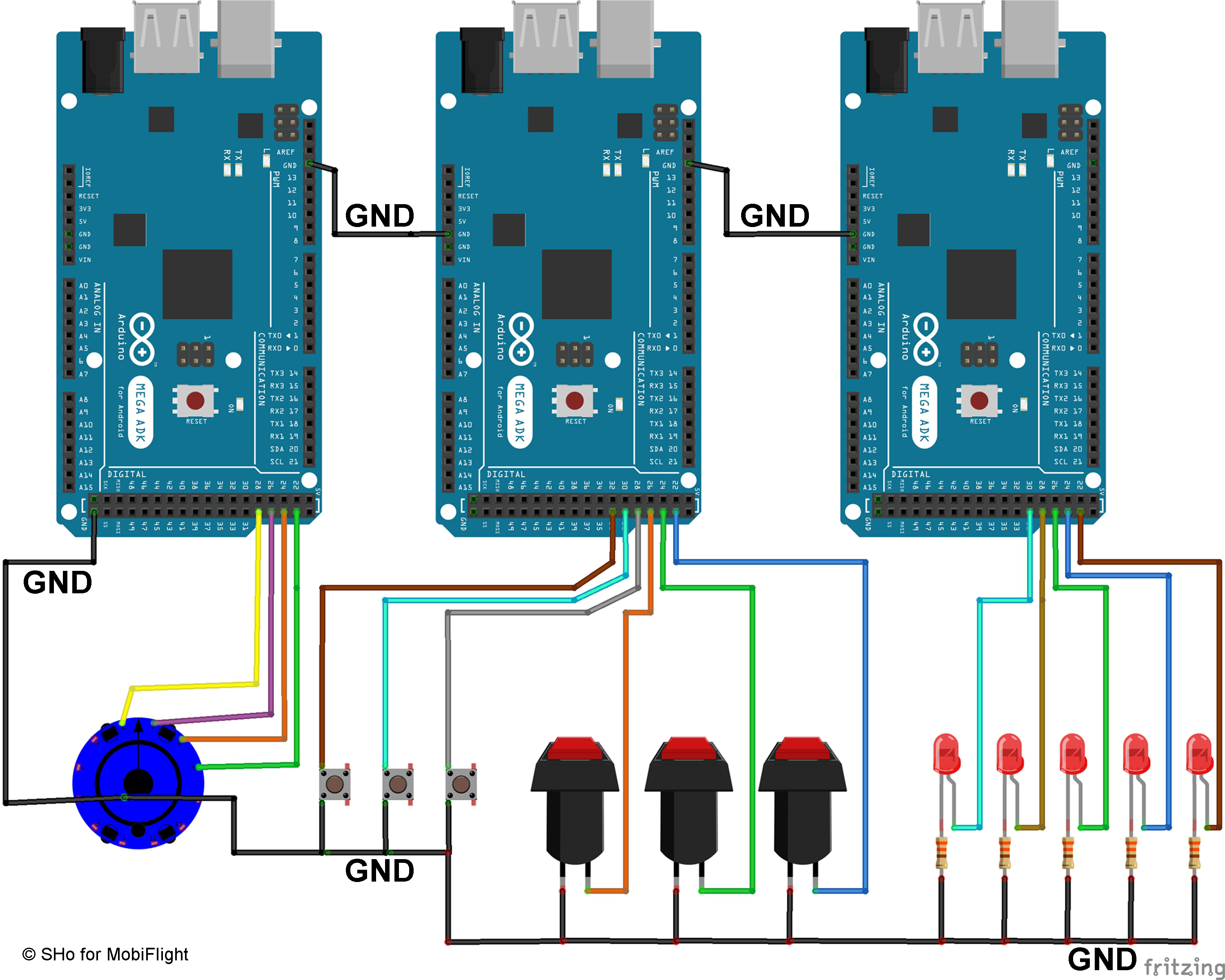
A picture explains more than 1000 words:

Here is a small diagram of how to get a common GND with several MEGA's and how to then connect the components correctly.

It is easy to see that when you connect the respective GND to the other MEGA's, you get a common GND for all connected components.

The devices shown are examples and symbolically show the range of devices that can be connected to MobiFlight.


Picture is bit large - sorry ;)

@pizman
Maybe the text post can be placed elsewhere so it can be found more easily.
Grüße,
Stephan (Time: UTC+2)
2017-11-23 20:05
Avatar
herly
Posts: 67
Hallo zusammen,

Thanks lot for the valuable information, might be the device's name are too long word. I will modified this evening and inform to you the result.

Warm regards,
Herly
2017-11-23 23:40
Avatar
herly
Posts: 67
Finally I disconnect all 6 arduinos and tried to connect only 3 arduinos at the moment. As Pizman said I made simple device's name which previously too long. Re-uploaded it and its function. I am very happy...thanks lot all for valuable guidance.

Warm regards and schönes Wochenende!
Herly
2017-11-25 02:42
Avatar
StephanHo
From: EDDG, Germany
Posts: 1867
Supporter
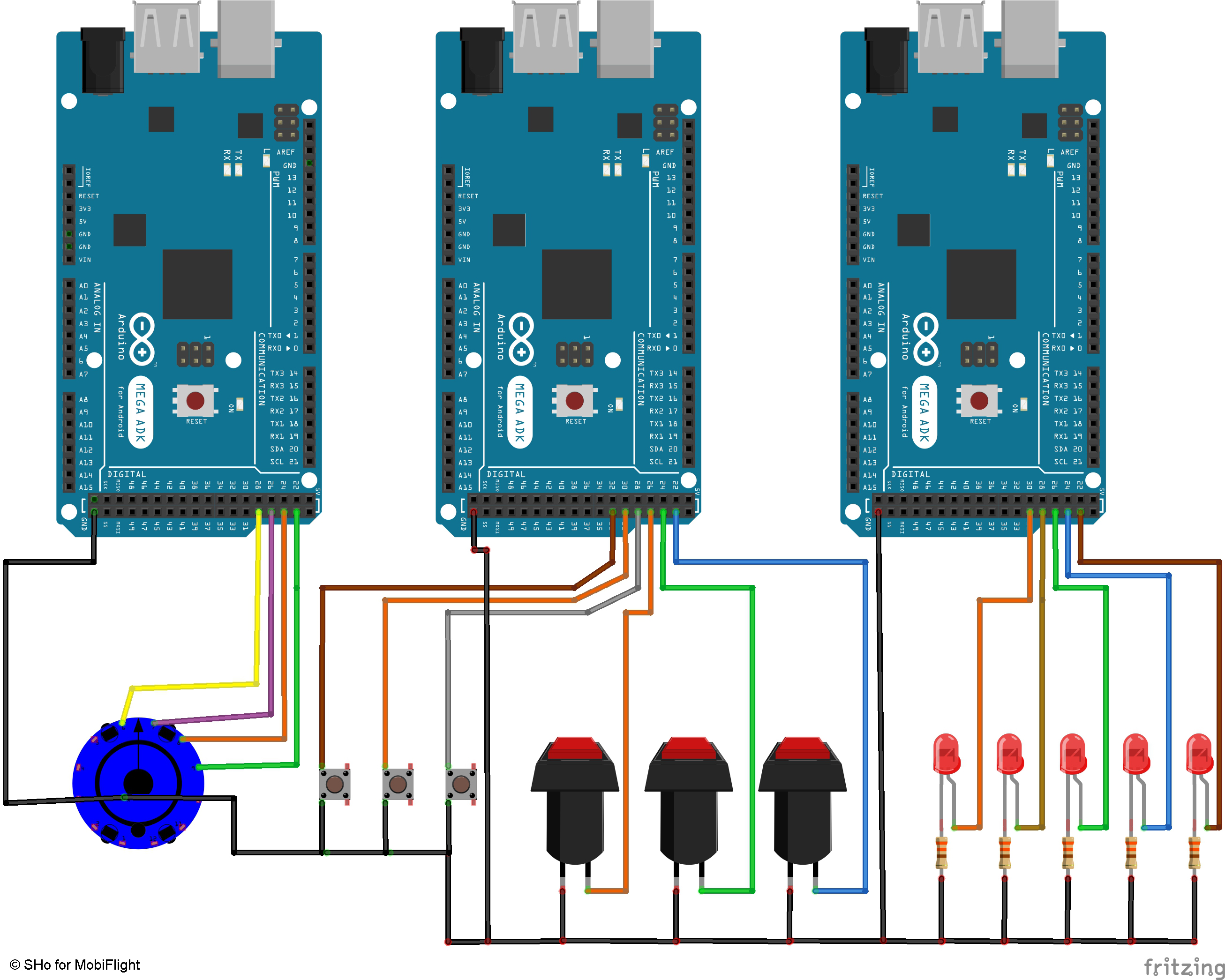
I changed the layout again.

The first layout is so useful, but only if only small currents flow.

The new layout also takes into account higher currents, so that now all components have the same GND, but the current can flow back into the respective module. As a result, the current does not have to flow through a point of the GND connection, but rather back into the module via the respective GND point.

Grüße,
Stephan (Time: UTC+2)
2017-11-25 10:52
Avatar
herly
Posts: 67
Thank you Stephan,

I have a question how to improve display delay on MCP? I use PMDG 737...

However, I send greeting to all of you.

2017-12-27 00:06
Avatar
herly
Posts: 67
Hi colleagues,

How is the setting for MACH? For IAS it works, but setting for MACH does not work even I follow the instruction.

Anybody could help me? Thanks lot in advance.
2018-01-14 15:44
Avatar
StephanHo
From: EDDG, Germany
Posts: 1867
Supporter
Hi herly,

did you check the MACH config on the Ground or in the Air?

At the AP you can show MACH-Speed only above FL260.

But the Mach-Speed is always shown on the left PFD at the bottom of the speed tape.
Grüße,
Stephan (Time: UTC+2)
2018-01-14 18:22
Go to page 1Go to page 012Go to page 2Go to page 2