Hi herly,
I will try to help you with your Stepper.
The Stepper with the ULN2003 you do already have. So take it and lay him beside the MEGA.
I assume that you have the Arduino-IDE installed and you know where it is on your Hard-Disk.
On the Screenshots you see the German Menuitems but it should be easy to find the same in English.
First you have to create a device.
Open MobiFlight. You will see the Main-Menu. Then you got to
Extras and then to
Settings.
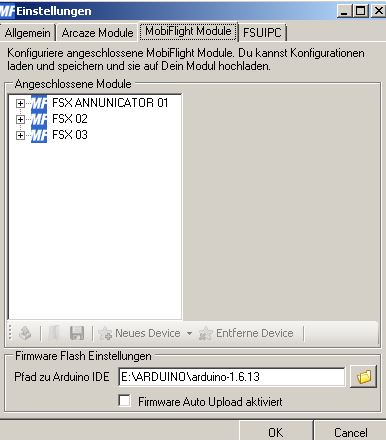
In the Window of the connected Modules you should find your MEGA with the created Firmware.

Klick on this entry on this assigned MEGA, klick the right Mousebutton and then on
Create Device and choose
Stepper

There will pop up a window with the Pin Settings Motor. Use the pull down for the pins and choose the connectors (Pins)
of the MEGA you want to connect the Stepper each in Sequence.
After you have done this you have to upload your Config to the MEGA.
Note that you have filled in the Path to your Arduino-IDE at the bottom of this window.
Then look to the Icons a bit above and click on the one with the green arrow (left most one). After this has finished
you will see a little Requester with the hint that the upload has been done succesfully.
Now go to the Disk-Icon and save your Config-file on Disk.
Now you can leave this Window with
ok and you got the Main-Menu back again.

Now double-klick the first entry and insert a description i.e. Stepper Flaps and activate this item left with setting a hook.
Then go to the end of the line and klick on the field with the "
..."
A new window will pop up. Choose
FSUIPC.

Aside from Offset insert the Offset for the Flaps-Position of the FSX:
0x6568
The Offset has is from Type
Float and a Size of
4 Bytes.
The Mask value appears automaticly.
Set a hook left of Transform and insert right of Transform
$*1000
Change to the
Tab Display

Choose your MEGA-Modul in Modul.
As Type you choose the
Stepper.
In Steps per revolution you insert aside
Sim/Stepper 3600 and right
2040
Aside
Test-Value you insert
2730
Now you can connect your Stepper to the MEGA at the Pins you defined earlier.
If you have done so you can press the
Test-Button. Your Stepper should now run into the max-Position. After pressing Stop the
Stepper will return to his Start-Position.
If this has been successfull you are nearly ready.
So your flaps won't work correctly because you have the PMDG 737NGX. Here you have 9 Detents with the Flaps: 0 (Flaps up),
1, 2, 5, 10, 15, 25, 30 and 40 (down)
This is no Problem for MobiFlight.
Go to the
Compare-Tab and look to the last section, named
Interpolation-Settings

Set the hook so that MobiFlight knows to use these settings.
Then insert the following values in sequence into each row:
Input Output
0 0
1000 360
2000 750
5000 1140
10000 1500
15000 1790
25000 2070
30000 2380
40000 2690
What does this mean?
The FSX-value is a 4 Byte Float and starts at 0. If the Flaps go to Position 1 the value also is 1. If you don't transform the value $*1000 you won't see any movement between 0 and 1. Same between 1 and 2, bit mor between 2 and 5 and so on.
Remember, a full circle has 360 degrees. You guess what is coming: We temporayly make a circle with 3600 "degrees". That has been
the input at Sim/Stepper - you know? It works as follows:
At Flap position 1 the FSX value is also 1 but Mobiflight knows that it has to transform the value *1000, so the output is 1000
before leaving Mobiflight. Mobiflight now knows , that a value of 1000 at the input he has to send 360 Steps to the stepper (output).
3600 Stepper-Pulse are for one Revolution but we only need for nearly 270 degrees for Position 40 - nearly 2700 steps.
Therefore the table above. These values are for my Stepper and my Skale.
To find your own values you have this as hint.
To define your values you can do this:
Go to the
Display-Tab
If you have your own scale for the Flaps make a pointer and glue him on the steppers axix. Put him on the middle of the up-marker of the scale and press
Set-0-Point.
This is now the reference-point of the Stepper where he runs to if the FSX-value is 0.
Now you can calibrate your own skale and change the values in the comparision-list.
In Example you set the Test-value in the Display-Tab to 360 and press the Test-Button. The pointer now runs to the position 1.
If he stops in the middle of the marker you can keep this value. Otherwise press stop - the Stepper runs to the 0 Position.
Now you take the "manuell Calibration" an set the slider to the +50 position. Then press "move" and count, how often you press
"move" to reach the 1 position. If he is not in the middle, put the slider on the +10 position and press "move" again.
Same with the +1 Position until the pointer is in the middle. This is your value for Position 1.
Do this for the other Positions until you have all values complete and transfer these values in the compare-tab and there into
your interpolation-List. The old values may be overwritten.
Now you start your FSX with the PMDG. After the PMDG is initialised you start Mobiflight. Begin to set your Flaps to a value of your choice
and look, what your Stepper is doing. Contented? Fine. That's it. Have fun!




 Are the devices away ( Not longer on the Board ? ) so the Configs have no Hardware selected now


 Supporter