MobiFlight Community Support

Welcome to the forum for MobiFlight! Feel free to reach out to the community in case you have questions, issues or just want to share great ideas or details about your latest home cockpit project.

You like MobiFlight? Donate via PayPal and support the MobiFlight development. Thanks! 

05/03/2024 - This forum is read-only

The community support for MobiFlight has moved exclusively over to our Discord server. Register for free and enjoy more interactive functions like image and video upload, voice chat. More than 7,000 registered users around the world make it a great experience!

See you on our MobiFlight Community Discord server.

A HUGE Thank You to everyone who participated in the forum, especially obviously to Pizman and Stephan who did an outstanding job over so many years providing an incredible service to the MobiFlight community.

The forum is still providing a lot of good content, hence we keep this information accessible.

Go to page 1Go to page 0123Go to page 2Go to page 3
Avatar
FredrikH
From: Råå, Sweden
Posts: 62
Hi

I have read about the "Precondition Tab", have some question regarding it:
1.) Is the Precondition like rules you can set when you whant to control more than one function with one switch?
2.) I have read that you can be shown ex. COM1/2 or NAV 1/2 in the same led-segment:
a.) Are the some limit in how many condition you can set in a single switch or led-segment?
b.) Can you control by a switch what type of segment you like displaying?

Best Fredrik
____________________________________________
Computer: Windows 10, 64-bit, Intel i7 8700k, Asus ROG STRIX Z370-F GAMING, 16GB RAM and Asus GTX1080

Game control: Razer Nostromo, Keyboard, Saitek Pro Flight X-56 Rhino H.O.T.A.S.
2017-07-17 23:59
Avatar
pizman82
Moderator
From: ETSI, Germany
Posts: 6010
Supporter
In short words....
Yes, No and Yes :w00t:

A Precondition define : " Let the Config Work if precondition is TRUE "
This can be used for INPUT and OUTPUT ..... So you can for example define that a LED OUTPUT should only show the Offset Status when Precondition is TRUE... Or you can Say a INPUT Button should only controll function xcz if Precondition is TRUE.

You see there is no LIMIT in the Config itself, cause the Config NOT controll multible functions itself... every function got its own config !!!

For example if you like that a Display should show Com1 and Com2 even what function is still active then you need TWO Configs for this.... One for COM1 and another for COM2.
The Precondition then is used in Both configs to define WHAT Config is active and controll the Display at the moment and what config is NOT active at the moment.
( If both configs are active same time there is a issue cause both try to write the same Display.... Thats not posible.

Same works with INPUT too.... If you like that one Button should controll 2 different things in case of a define situation you have to make 2 seperate Configs for each function (both with same button as device) .... Then you say again in both configs with precondition WHEN the Config should be active and when it should be disabled.
Here the same issue.... Without a Precondition the button would send its command to both functions same time.

*******
Finaly you have to know.... A Precondition is always a check of a define OUTPUT Config..... You say in Simple words " My config should only work if Value of Outputconfig XXXX = YYYY"

****
Short example ....( I know this is stupid but its just to tell you the technic)
You like to show Com1 and Com 2 on the Same Display.... Com1 should be shown if Gear is down Com2 should be shown if Gear is Up.
For this you need 3 Configs.
1. Com1 Config (Offset set to the Display)
2. Com2 Config ( Offset to the same Display like the Com1 Config)
3. Readout Config from the GEAR Offset ( To define our precondition later)

NOW you make in the Com1 and Com2 Configs each a precondition.....
The Com1 get the Condition " Only Work if Gear Offset = 1
The Com2 get the Condition " Only Work if Gear Offset = 0

Finish !!! Now Com 1 is shown when gear is down..... Com2 is shown when gear is up.

*********
This was just a short overview.... For advanced things you additional need custom Offsets and OR/AND Parameters.... But theoretic you can set hundret different things to only one Button or show hundrets of different things to only one 7 Segment Display.

Please check the search engine KEyword "Precondition" You find lots of stuff.... Or ask here if you need more help !
Good Luck !
2017-07-18 01:15
Avatar
FredrikH
From: Råå, Sweden
Posts: 62
With other words I make the same thing like the VrInsight Combo can, maybe even more :)

I have understand it all but, I looking at the program and I have maked two config in OUTPUT and INPUT = 4 configs.

Whatever I am looking at I cannot see any Precondition for the two INPUTS configs... Can I get around it so a Precondition is inputs config?
[Last edited by FredrikH, 2017-07-18 14:06]
____________________________________________
Computer: Windows 10, 64-bit, Intel i7 8700k, Asus ROG STRIX Z370-F GAMING, 16GB RAM and Asus GTX1080

Game control: Razer Nostromo, Keyboard, Saitek Pro Flight X-56 Rhino H.O.T.A.S.
2017-07-18 12:34
Avatar
pizman82
Moderator
From: ETSI, Germany
Posts: 6010
Supporter
Sorry my friend... I don´t understand your question.

Maby you tell me what exact you wanna do.... so i can give you a step by step guide....

If you only need a guide to make a Precondition in Inputs.....
THIS is the same like in the Ecample from my last posting with the Output of Com1 and Com2 even Gear is Up or Down....
Only difference is you do this in a INPUT config now....

For Example: You have ONE Button that should controll the Taxi Lights always when Gear is down.... AND the Same Button should control the LogoLights if Gear is UP....
Now you need first 1 Output Config that reads out the GEAR Status.... ( Like in the Other Example)
Then you need 2 INPUT Configs..... Both with the SAME Button as device.
Config 1 is set to the TAXI Light Input Controll
Config 2 is set to the LOGO Lights Input Controll

Now again like last time create in each of this 2 Input Configs a Precondition....
the first get Condition " Only work if GEAR Output Config = 1"
The Second get Condition " Only work if GEAR Output Config = 0"
Finish. Now the Button controll the Taxi lights always when gear is Down..... And it controll the Logo Lights when Gear is up.


****
Again this is a stupid example and not needed in a real cockpit. Only to show you the basic technic.

I Hope your question is solved.... if Not pleas tell me exactly a example what you like to do... So i can give you a concrete awnser !
Good Luck !
2017-07-19 01:16
Avatar
FredrikH
From: Råå, Sweden
Posts: 62
Hi

I did not know what was I looked for :D

If you are looking at: http://www.vrinsight.com/public_html/index.php?module=Board&action=SiteBoard_1&iBrdNo=30&sMode=SELECT_FORM and its displays. Look at the information in the display. I think I meant, yesterday if you can change the showing information with a switch?

Example the led-segment is showing COM1 when switch is in poss... 1 and show COM2 when switch is in poss... 2 without any link too FSX. I understand you example in the earlier post butt you have to controll the showing information by youselt have not you?

Best Fredrik
____________________________________________
Computer: Windows 10, 64-bit, Intel i7 8700k, Asus ROG STRIX Z370-F GAMING, 16GB RAM and Asus GTX1080

Game control: Razer Nostromo, Keyboard, Saitek Pro Flight X-56 Rhino H.O.T.A.S.
2017-07-20 21:40
Avatar
pizman82
Moderator
From: ETSI, Germany
Posts: 6010
Supporter
Oh Ok... Now its clear....

As you already know we need a existing variable to make a Precondition ( Like the Gear Offset in the examples)

For your situation you can use a existing variable if possible.... For example the COM Transmit Offset ( Witch Microphone is active at the moment)
So you can say for example IF Microphone of COm1 is active Com1 should be shown in the Display.... If Com2 Micro is active show Com2 Frequency in the Display.

But i think you realy like a Input ( For example a 2 Position Switch) .... In Upper Position you like to Display Com1.... In Down Position you like Com2 on the Display....

HERE we get a little Problem cause Mobiflight NOT allow us to use a Real Switch Position for a Precondition ! As i told a Precondition needs always a Output Config from a OFFSET.
BUT We can use a trick..... We can work with a Custom Offset ! ( Custom Offsets are for example 66C0 - 66FF
A Custom Offset is a free FSUIPC offset that is not controlled by simulator itself....
In Easy Words...
You create a Input Config for the Switch that write our Custom Offsrt for example to 0 or 1 even witch postition the switch is.
Then you create a output Config ( No Device) and readout THIS Custom Offset. ( Cause we need a output Config for our Precondition)
Finaly you create 2 Output Configs for the Display ( one for Com1 and another for Com2)
To this 2 configs you set each a procondition.... Com1 only work if Custom Offset Readout Config =0 .... Com2 only work if the custom Offset = 1

NOW you can toggle your switch and set with this switch the custom offset to 1 or 0..... And the Display show Com1 or Com2 in case what value the Custom offset got at the moment !

I Hope you understand.....

PS
Short overview to your question with a bigger number of used functions....
With this technic you can for example use a 12 Position Rotary Switch instead of the 2 Position switch.... So you can theoretic show 12 different things on one Display.... Simple use now Custom Offset Values not only 0 and 1 use 0-11 now.

You can do this with a Button too.... Simply make a logic that the Button should increase the Offset Value +1 .... So it start on 0 every push add +1 to the Vallue...... Extremly you be able to set 1000 Functions to a Display with only one button !

Please try out.... If you check the basic technic the rest is pretty simple !

Good Luck !
2017-07-21 01:04
Avatar
FredrikH
From: Råå, Sweden
Posts: 62
That sounds very great, no need of the compact MCP Combo :)

Thanks a lot!

I need that the display can show; (X = Digit)
XX - Flaps poss, instead of a gauge
XXX - AP Course
XXX - AP IAS / MACH Display
XXX - AP Heading Display
XXXXX - AP Altitude Display
XXX - AP Vert Speed Display

Ans do on :)

If I can fix some kind of panel holder for the led-segments module, wire the cables from the segment into a breadboard there the MAX7219 Chip is placed. PCB is better but I acnnot solder that kind, just component a its cables´ :)

Best regards Fredrik
[Last edited by FredrikH, 2017-07-21 17:55]
____________________________________________
Computer: Windows 10, 64-bit, Intel i7 8700k, Asus ROG STRIX Z370-F GAMING, 16GB RAM and Asus GTX1080

Game control: Razer Nostromo, Keyboard, Saitek Pro Flight X-56 Rhino H.O.T.A.S.
2017-07-21 17:26
Avatar
pizman82
Moderator
From: ETSI, Germany
Posts: 6010
Supporter
First i´m glad i could help you.....
But now i´m confussed again !

Why do you talk now about X= Diggit Number of Diggits ??

You still request a technic to show lots of different things on ONE Display.
This Display got 8 Diggits
So theres no matter how many Diggits are used with ONE Function cause you toggle them and always show only one function at a time.

Myself i will not recomend a building like this. Maby for Com1/Com2 this is Ok cause you not use Com2 often while a flight..... But Main Functions like the MCP Displays are need all the time.... So they should be shown all the time on there OWN Displays. ( I Think you will not going to be happy with a MCP that have only one Display ! )

****
And please NOT work with a breadboard and a self Mounted Max7219 Chip. I will say you get System Crashes every 5 Minutes.... The Maxchip is not designed for a Breadboard.... It must be solderd verry accurate to prevent issiues !

I will recommend.....
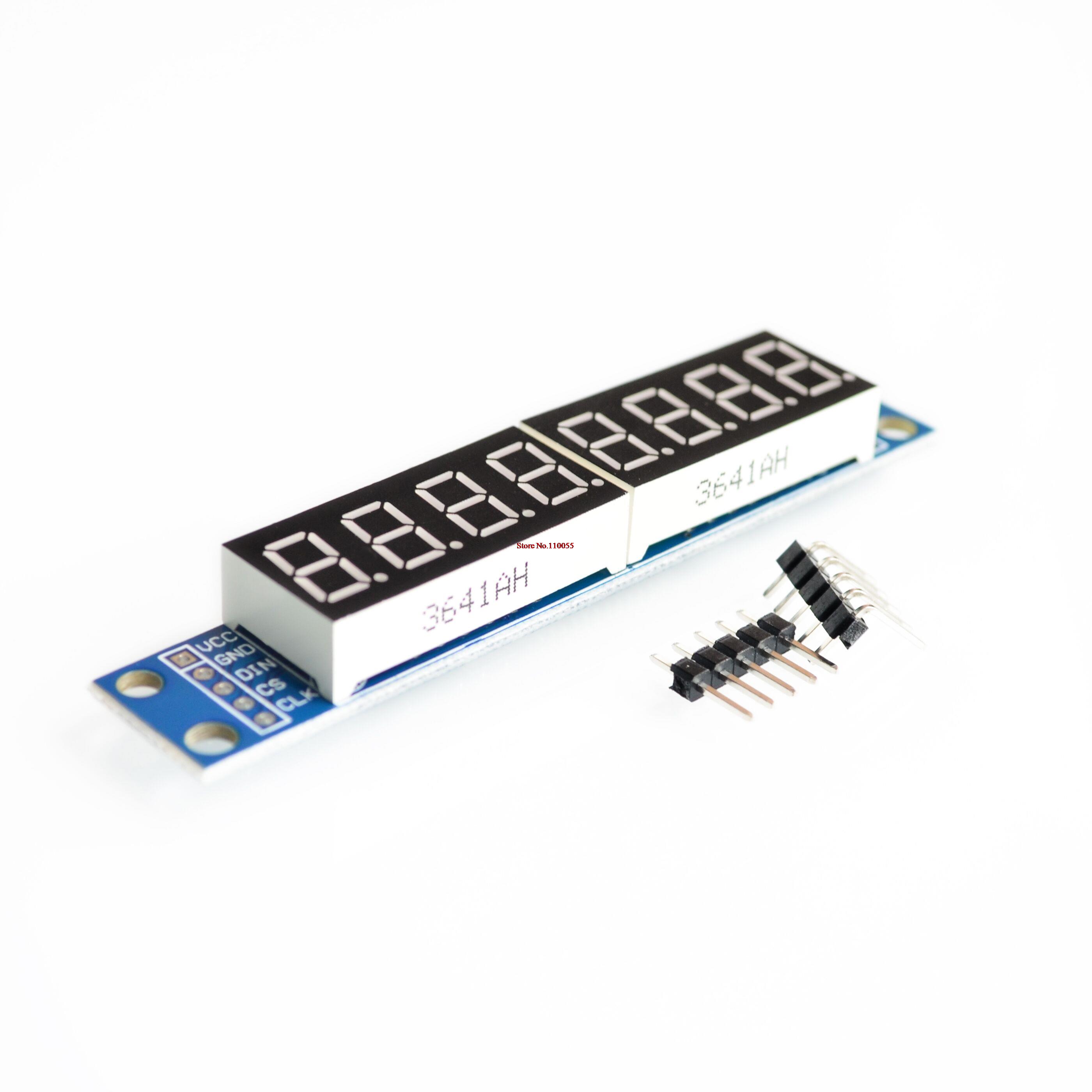
As i say in most topics.... Think about PREMADE Max7219 Tubes with Removeable Diggits ! .... https://www.amazon.de/8-Digit-Display-MAX7219-Digital-Control/dp/B00P9277BE
1. You not need a Breadboard or a self build PCB... The hole Technic is perfect set on the Tube.....
2. You can Remove the Displays (2x4 Blocks) simply by pull it off.
3. You can set on the Free Pins behind the Original Displays after pulling them off every Display ( 1-8 Diggits) as you like ( Or A Combination Liek 1x5 1x3)
4. The Connection can be done with Dupont Crimp Connectors if you not like to solder and the Displays can be wire up to 30cm away from the Max7219 Tube.... So you not have to mount the tube behind the Display in Panel.... You can set it somewhere internal where you got space and only use the Diggits itself in the Panel !

****
Finaly... Please do what you like.... But just think about this.... It will save lots of time and work wonderfull !
Good Luck !
2017-07-21 22:01
Avatar
FredrikH
From: Råå, Sweden
Posts: 62
No, I will use one led-segment for each MCP displays but a combo for NAV and one for com .... I meant I need:
2 led-segment module or 3 .... Not combo these to one led-segment, I think you hav not needing to be confused any more. the mobiflight is looking wonderful :)

Somethimes the my engllish is perfect and makes is hard understanding but I have understand the most important anyway. When seeing at the: https://www.amazon.de/8-Digit-Display-MAX7219-Digital-Control/dp/B00P9277BE I did not realise that the segments is removeable, its great news. If I understand it correct I can replace the 4 segment for a 3 segment, is not it?

Nr 3:
If correct. You mean I can mix the module as I like, the importans is that I do not use more than 8 diggits toghether. Correct 1x4 + 1x4 or 1x2 + 1x6 .... you do not needing use of all if you do not have to ;)

The above module is the way to go and the best is that is not expensive just 20Sek for one module :)
[Last edited by FredrikH, 2017-07-21 23:13]
____________________________________________
Computer: Windows 10, 64-bit, Intel i7 8700k, Asus ROG STRIX Z370-F GAMING, 16GB RAM and Asus GTX1080

Game control: Razer Nostromo, Keyboard, Saitek Pro Flight X-56 Rhino H.O.T.A.S.
2017-07-21 23:01
Avatar
pizman82
Moderator
From: ETSI, Germany
Posts: 6010
Supporter
Hi Fredrik

I know my english is verry poor ( just got it 5 Years in school long time ago) .... But as you say... It´s enough to understand each other!


First to Displays
there are 2 Display Typs on Market... One with Fixed solder Displays ( Mostly Blue Color and NOT good for your project) like this http://g02.a.alicdn.com/kf/HTB1WECMRXXXXXXCXFXXq6xXFXXX7/MAX7219-Digital-Tube-Display-Module.jpg AND the others with Removeable Displays like i linked before.... Get shure you order the correct kind.
Price is realy good (mostly below 4$ per Tube) but calculate with long delivery from China 3-4 Weeks in Germany)

To Your Question #3.
Basicly Yes but with some restrictions.

1. Yes you not need to use all 8 Diggits.... Some Cockpitbuilders use for a more tidy system simply 1 Module for 1 Display.... If the Need only 3 Diggits they let the other 5 Diggits Empty. So this is no Problem !

2. Mixing is posible ... But i will recomend to NOT make A config that over 2 Tubes ( For Example you need 2x5 & 1x6 Diggits ) Theoretic you can Use 1x5 on Tube 1 ... 1x5 on Tube 2 and the 6 Diggit Display then Split 3 Diggits from Tube 1 and 3 Diggits from Tube 2.
Here you got the Problem that Mobiflight not allowd us a "splitting" of 1 Configuration over more then 1 Tube. In that case you need to split the Value provisionaly via a Math Calculation ( This is VERRY Difficult and advanced) and show it on 2 Different "half" Displays.... Here i high recommend to use a additional tube..... Thats better!
The Best Way : If you like to split then not use more then 2 Displays on one tube ( Cause it have exact 2 Output Rows) For 3 Displays you have to wire it much more difficult


3. One last Thing.... You can NOT set a custom Display like 1x5 DIRECT on the Empty Tube.... Cause every Display got a own Pin Logic.... The Pinheaders on tube are exact for this 4 Diggit Displays that is installed when you buy it.....
BUT You can Wire your display easy to it.
Below the 4 Diggit Displays there are 12 Pins ( 8x Segment Pin and 4x Diggit Pin) You Simply wire the 8 Segments and the needed Diggit Pins ( For Example 3 for a 3 Diggit Display) to youre Display. THATS why i recommend to not use more then 2 Displays... Cause you got on Both sides this 8 Segment Pins.... So it´s just prepared to set 2 Different Displays already .....
For ONE Display with for example 6 Diggits you only use 1x8 Segment Pins ( The other side Segment mins are not used) and you use 4 Diggit Pins from one side and 2 from the Other side. ... AGAIN : Verry Easy... Just try out my friend !


And NOT be scarred about the soldering.... You can use Connectors for this or you easy put the wire in the empty Pin and put 1 Drop of soldertin into. Thats not realy difficult.
I´m a aboslute Noob in soldering but this Display i can do myself without problems !
Good Luck !
2017-07-22 04:54
Avatar
FredrikH
From: Råå, Sweden
Posts: 62
Yesterday I bought these on ebay:
http://www.ebay.com/itm/8-digit-LED-display-module-MAX7219-digital-control-tube-red-matrix-fr-Arduino-XV/222557035163?ssPageName=STRK%3AMEBIDX%3AIT&_trksid=p2057872.m2749.l2649

Instead for use 1x4 + 1x4 I will maybe use 1x2 + x3, when buying the led-segment?

Common Cathode is the only important if I bought a displays without a chip module, is not it?

You wrote:
"4. .... Displays can be wire up to 30cm away from the Max7219 Tube.... So you not have to mount the tube behind the Display in Panel.... You can set it somewhere internal where you got space and only use the Diggits itself in the Panel !"

How can I fix the diggits into the pane, is there some kind of ready to use panel holder?
[Last edited by FredrikH, 2017-07-22 11:24]
____________________________________________
Computer: Windows 10, 64-bit, Intel i7 8700k, Asus ROG STRIX Z370-F GAMING, 16GB RAM and Asus GTX1080

Game control: Razer Nostromo, Keyboard, Saitek Pro Flight X-56 Rhino H.O.T.A.S.
2017-07-22 09:37
Avatar
pizman82
Moderator
From: ETSI, Germany
Posts: 6010
Supporter
Hi

1. the linked Tube looks good. I hope for you they send you the same like on Picture. Then its perfect !

2. For your Displays your right.... the Most important fact is "Common Cathode" ! ..... But Please note the follow things:

a) Check the Pin Logic in the Data Sheet of the Displays..... Specialy the 2 and 3 Diggit Displays sometimes are a little crazy.
Normaly a Display have 8 Segment Pins and so much Diggitpins like it have diggits.... ( a 3 Diggit Display e.g. have 11 Pins...8 Segmentpins + 3 Diggitpins )
BUT Some Displays work different and have 8 Segmentpins for each Diggit.... ( Here a 3 Diggit Display got 27 Pins ... 3x8 Segment and 1x3 Diggit = 27 )
THIS is bad cause you need to combine all different SegmentPins to only one Wire into the Max7219 .
So keep a Eye on this when you order the Displays.
b) Displays sometimes have additional Symbols like a Doublepoint for a clock ( xx:xx ) or a + ° and so on.... In That fact these Symbols have a own segemnt and the Display need MORE then 8 Segment Input Lines.... But we have Only 8 !!
Here you can let these characters Empty OR you have to make a special technic and set this symbols lie a additional diggit. But not think about this... For first trys i would recommend to not use these symbols or simply buy a diggit without this stuff.

3. Panel Holders !! No there isn´t ( I dont know Panel Holders for sale )
If you not need a easy removeable Version you can Cut the Displayhole in Panel 1:1 to the Display and simply glue them into the hole....

Myself i mount the Displays into a selfmade Breadboard like this https://www.reichelt.de/?ARTICLE=8269&PROVID=2788&wt_mc=amc141526782519998&gclid=EAIaIQobChMIh6ugs4ad1QIVB77tCh3SQQixEAQYAiABEgJFxPD_BwE .
Then i cut it maby 2cm larger then the Display itself and drill 2 holes on left and right.
Behind the Panels i glue 2 small wood pieces left and right of the Display CutHole. .... Then i can screw the selfmade DisplayPCB on this Woodstripes.
(Bad to explane.... i hope you understand. Sorry i have no Photo here at the moment)
A good fact here is that i can solder the Displays into the Breadboard and can cable them on this to a norm Connector. So you can pull of the complete wire on one Position if you like to change your hardware in case of an issue.

Have Fun !!
Good Luck !
2017-07-22 16:04
Avatar
FredrikH
From: Råå, Sweden
Posts: 62
iconpizman82:

Oh Ok... Now its clear....

As you already know we need a existing variable to make a Precondition ( Like the Gear Offset in the examples)

For your situation you can use a existing variable if possible.... For example the COM Transmit Offset ( Witch Microphone is active at the moment)
So you can say for example IF Microphone of COm1 is active Com1 should be shown in the Display.... If Com2 Micro is active show Com2 Frequency in the Display.

But i think you realy like a Input ( For example a 2 Position Switch) .... In Upper Position you like to Display Com1.... In Down Position you like Com2 on the Display....

HERE we get a little Problem cause Mobiflight NOT allow us to use a Real Switch Position for a Precondition ! As i told a Precondition needs always a Output Config from a OFFSET.
BUT We can use a trick..... We can work with a Custom Offset ! ( Custom Offsets are for example 66C0 - 66FF
A Custom Offset is a free FSUIPC offset that is not controlled by simulator itself....
In Easy Words...
You create a Input Config for the Switch that write our Custom Offsrt for example to 0 or 1 even witch postition the switch is.
Then you create a output Config ( No Device) and readout THIS Custom Offset. ( Cause we need a output Config for our Precondition)
Finaly you create 2 Output Configs for the Display ( one for Com1 and another for Com2)
To this 2 configs you set each a procondition.... Com1 only work if Custom Offset Readout Config =0 .... Com2 only work if the custom Offset = 1

NOW you can toggle your switch and set with this switch the custom offset to 1 or 0..... And the Display show Com1 or Com2 in case what value the Custom offset got at the moment !

I Hope you understand.....

PS
Short overview to your question with a bigger number of used functions....
With this technic you can for example use a 12 Position Rotary Switch instead of the 2 Position switch.... So you can theoretic show 12 different things on one Display.... Simple use now Custom Offset Values not only 0 and 1 use 0-11 now.

You can do this with a Button too.... Simply make a logic that the Button should increase the Offset Value +1 .... So it start on 0 every push add +1 to the Vallue...... Extremly you be able to set 1000 Functions to a Display with only one button !

Please try out.... If you check the basic technic the rest is pretty simple !


Hi

I have test that we talked about earlier with led-segment and switches with great result :)

I have also test some rotary encorder without no problem :)

I have continue and ordered 5 more of the led-segments from China, the bulting and painting is done so I will live you a image soon, some more things to make first :)
____________________________________________
Computer: Windows 10, 64-bit, Intel i7 8700k, Asus ROG STRIX Z370-F GAMING, 16GB RAM and Asus GTX1080

Game control: Razer Nostromo, Keyboard, Saitek Pro Flight X-56 Rhino H.O.T.A.S.
2017-09-04 17:33
Avatar
FredrikH
From: Råå, Sweden
Posts: 62
Hi

I have ordered 4 new led-segments module for my project. I have made the panels for my components by now and I am drilling the holes :)

We talk earlier separate the led-segment from the module, some question bellow:

1.)
If removeing the led-segments I am going to need some wires but you need a very thin wires, what sort of wires?

2.)
If I am correct you said max 30 cm beteween the module and the led-segment, does not you?

Fredrik
____________________________________________
Computer: Windows 10, 64-bit, Intel i7 8700k, Asus ROG STRIX Z370-F GAMING, 16GB RAM and Asus GTX1080

Game control: Razer Nostromo, Keyboard, Saitek Pro Flight X-56 Rhino H.O.T.A.S.
2017-09-19 17:14
Avatar
StephanHo
From: EDDG, Germany
Posts: 1867
Supporter
Hi Fredrik,

you do not need very thin wires and not very thick ones.
These are completely sufficient for normal wiring: https://www.reichelt.de/Kupferlitze-isoliert/LITZE-SW/3/index.html?ACTION=3&LA=2&ARTICLE=10298&GROUPID=4487&artnr=LITZE+SW&SEARCH=%252A
Only for wires with great currents (>2A) you need thicker ones.

30 cm are not a fixed specification, you can also take 40cm. In doubt you have to try out longer connections before.
Grüße,
Stephan (Time: UTC+2)
2017-09-19 19:17
Go to page 1Go to page 0123Go to page 2Go to page 3