MobiFlight Community Support

Welcome to the forum for MobiFlight! Feel free to reach out to the community in case you have questions, issues or just want to share great ideas or details about your latest home cockpit project.

You like MobiFlight? Donate via PayPal and support the MobiFlight development. Thanks! 

05/03/2024 - This forum is read-only

The community support for MobiFlight has moved exclusively over to our Discord server. Register for free and enjoy more interactive functions like image and video upload, voice chat. More than 7,000 registered users around the world make it a great experience!

See you on our MobiFlight Community Discord server.

A HUGE Thank You to everyone who participated in the forum, especially obviously to Pizman and Stephan who did an outstanding job over so many years providing an incredible service to the MobiFlight community.

The forum is still providing a lot of good content, hence we keep this information accessible.

icon
Avatar
inancatil
Posts: 47
Hello , trying to figure out how this works but it is difficult to understand in german :) , Where should I choose for path? I installed arduino in C:\Program Files (x86)\Arduino
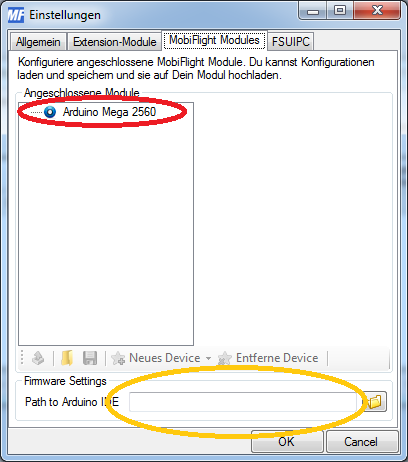
I choose this Arduino file and it doesnt give error but I cant add any card. I cant click on add device. My card is http://www.lenhart.lima-city.de/bilder/mega_sainsmart.jpg
Thanks in advance.
2015-01-06 11:51
Avatar
loony
From: Speyer, Germany
Posts: 157
Hi,

there seems to be a known issue with the Arduino installer. You should try using the ZIP file instead.
Before you can use your Arduino, you need to flash the current firmware 1.11.

Please report if you are able to flash with the MFConnector software or if the flashing process is only successfull with XLoader.

Thank you, Stephan
Mein Homecockpit-Projekt http://www.schwarz-stephan.de
2015-01-06 13:00
Avatar
inancatil
Posts: 47
iconloony:

Hi,

there seems to be a known issue with the Arduino installer. You should try using the ZIP file instead.
Before you can use your Arduino, you need to flash the current firmware 1.11.

Please report if you are able to flash with the MFConnector software or if the flashing process is only successfull with XLoader.

Thank you, Stephan


Tried ZIP file after deleting previous one but Still I am not able to click Add device. You said I need to flash firmware 1.11 but in mobiflight modules section , there is nothing to flash. Should I move any file from your program file to arduino ? or something like that?
2015-01-06 13:59
Avatar
loony
From: Speyer, Germany
Posts: 157
If there is nothing to flash, you did not install the Arduino Mega 2560 driver. Do you see an unknown device in your control panel? If yes, you need to install the driver from the "C:\Arduino\arduino-1.0.6\drivers" (your path might be different!) first.

You should then see this:


Please follow the documentation http://www.mobiflight.de/firmware-update.html and report again. Even it is only in German, some pictures say more than 1000 words :)
Mein Homecockpit-Projekt http://www.schwarz-stephan.de
2015-01-06 14:08
Avatar
inancatil
Posts: 47
iconloony:

If there is nothing to flash, you did not install the Arduino Mega 2560 driver. Do you see an unknown device in your control panel? If yes, you need to install the driver from the "C:\Arduino\arduino-1.0.6\drivers" (your path might be different!) first.

You should then see this:


Please follow the documentation http://www.mobiflight.de/firmware-update.html and report again. Even it is only in German, some pictures say more than 1000 words :)


I dont see unknown device. I did exactly what arduino installation guide said.Here is SS:https://www.dropbox.com/s/e5ems3obgefg6qz/Untitled.png?dl=0
In addition , I can use my arduino with link2fs.(I think you know this program).
2015-01-06 14:18
Avatar
loony
From: Speyer, Germany
Posts: 157
OK, so the Arduino is installed correctly and you have no device to choose in the MF Connector. I assume you already have tried things like disconnect / reconnect and reboot your computer?

What you can do, is to google for "XLOADER". With this tool you can flash the Mobiflight Firmware directly.
Mein Homecockpit-Projekt http://www.schwarz-stephan.de
2015-01-06 14:32
Avatar
inancatil
Posts: 47
It gives fail error. What is wrong with my arduino :confused:
EDIT: I uploaded your hex file manually editing file name as mobiflight_mega_1_1_1.cpp.hex
Still there is no device
[Last edited by inancatil, 2015-01-06 15:08]
2015-01-06 14:45
Avatar
loony
From: Speyer, Germany
Posts: 157
I remember a case, where I had to upload the original Arduino firmware first. Then I was able to flash the Mobiflight firmware. I read that some chinese manufacturers sometimes have a faulty Arduino firmware on the cheap boards ... Maybe you give this way a try?
Mein Homecockpit-Projekt http://www.schwarz-stephan.de
2015-01-06 15:13
Avatar
inancatil
Posts: 47
I broke my arduino I think , i cant even upload sketch now. Trying to get working back for now , then will try your suggestion.
2015-01-06 16:15
Avatar
loony
From: Speyer, Germany
Posts: 157
Normally you cannot break your Arduino, as far as I understood you can always flash the original firmware again.
Mein Homecockpit-Projekt http://www.schwarz-stephan.de
2015-01-06 16:25
Avatar
inancatil
Posts: 47
Tried uploading original firmware but uploading didnt end in 5 min then I remove usb and then nothing works. Tried reinstalling driver several times but probably it is broken :(.
2015-01-06 16:38
Avatar
loony
From: Speyer, Germany
Posts: 157
Very strange thing ... I found this on the internet, I hope it helps you to recover your Arduino
https://learn.sparkfun.com/tutorials/installing-an-arduino-bootloader
Mein Homecockpit-Projekt http://www.schwarz-stephan.de
2015-01-06 16:51
Avatar
inancatil
Posts: 47
Thanks for link , I need 2nd ardunio to try this link as I understand , I will borrow one from my friend and try it , this is last chance to get it back
2015-01-06 17:17
Avatar
sheerzo
Posts: 19
Open Arduino app and go...
File/Examples/Eeprom/eeprom-clear
2016-09-11 06:41
Avatar
sheerzo
Posts: 19
Open Arduino app and go...
File/Examples/Eeprom/eeprom-clear
I don't know anything about anything but i found this allowed me to reclaim my 2560 boards
2016-09-11 06:43
icon