MobiFlight Community Support

Welcome to the forum for MobiFlight! Feel free to reach out to the community in case you have questions, issues or just want to share great ideas or details about your latest home cockpit project.

You like MobiFlight? Donate via PayPal and support the MobiFlight development. Thanks! 

05/03/2024 - This forum is read-only

The community support for MobiFlight has moved exclusively over to our Discord server. Register for free and enjoy more interactive functions like image and video upload, voice chat. More than 7,000 registered users around the world make it a great experience!

See you on our MobiFlight Community Discord server.

A HUGE Thank You to everyone who participated in the forum, especially obviously to Pizman and Stephan who did an outstanding job over so many years providing an incredible service to the MobiFlight community.

The forum is still providing a lot of good content, hence we keep this information accessible.

icon
Avatar
francois_MCP
Posts: 1
Hello all,

I have a very old Microsoft SideWinder Force Feedback 2 Joystick. It works very well with FSX and Prepar3d. Except for force feedback feature, but that is not the topic.
Since MSFS does not recognize it, I am trying Mobiflight. Mobiflight makes me able to configure the buttons, but axis handling is really weird.

For instance, elevator seems to work with the next preset code:
iconCode:
-@ 32767 + (>K:AXIS_ELEVATOR_SET)

As well as rudder with:
iconCode:
@ 1 * 32767 - (>K:AXIS_RUDDER_SET)

However, Aileron does not at all work with the next code: there is just no reaction.
iconCode:
-@ 32767 + (>K:AXIS_AILERON_SET)

Finally, Throttle works with the next code, except that setting throttle to idle position engages reversers
iconCode:
-@ 32767 + (>K:THROTTLE_SET)


Did anyone succeed in making this joystick working with MSFS ? If yes, what is your setup ?

Thank you very much.
2023-09-20 21:16
Avatar
Keiji.K
From: Kyoto, Japan
Posts: 4
Hello francois_MCP
I also have the same Microsoft SideWinder Force Feedback 2 Joystick.
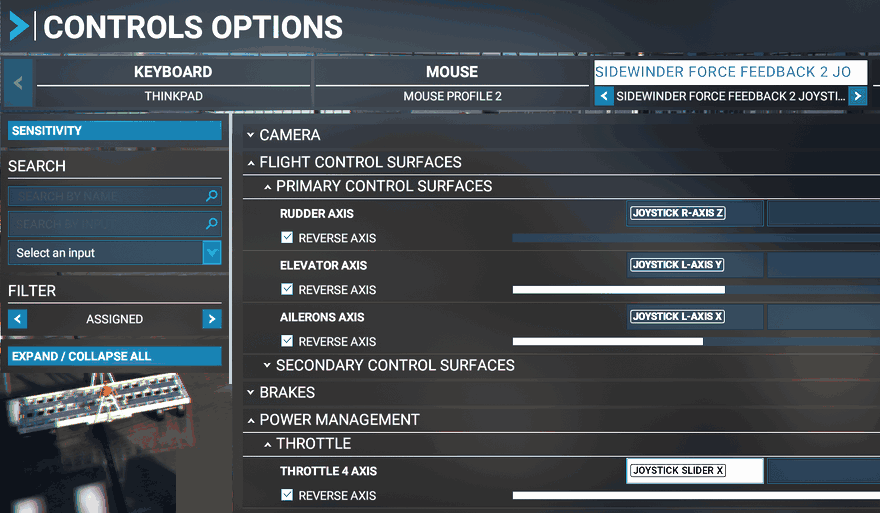
I am using it with MSFS2020. However, it doesn't recognize it automatically like previous versions of FSX, so I had to set the control options myself.

[Last edited by Keiji.K, 2023-09-24 01:14]
2023-09-23 03:19
icon