MobiFlight Community Support

Welcome to the forum for MobiFlight! Feel free to reach out to the community in case you have questions, issues or just want to share great ideas or details about your latest home cockpit project.

You like MobiFlight? Donate via PayPal and support the MobiFlight development. Thanks! 

05/03/2024 - This forum is read-only

The community support for MobiFlight has moved exclusively over to our Discord server. Register for free and enjoy more interactive functions like image and video upload, voice chat. More than 7,000 registered users around the world make it a great experience!

See you on our MobiFlight Community Discord server.

A HUGE Thank You to everyone who participated in the forum, especially obviously to Pizman and Stephan who did an outstanding job over so many years providing an incredible service to the MobiFlight community.

The forum is still providing a lot of good content, hence we keep this information accessible.

icon
Avatar
Difaverz
Posts: 3
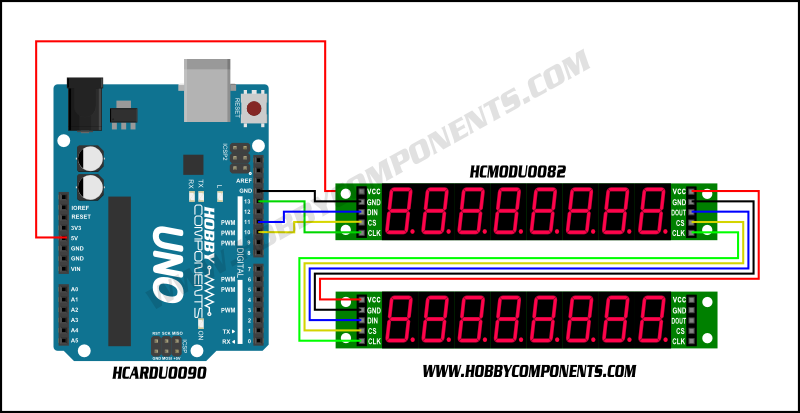
I have been trying for five days to get two max7219 panels to work from one arduino. I tried to connect them separately, but only one panel always worked. I have read tutorials on how to chain them, but they always use panels with different pins (I know I need separated v5 sources). So if I have two panels like this, I connected the first one to the arduino, how can I connect the second one?

2023-04-04 23:14
Avatar
ridgenj
Posts: 3
Hello, post in Discord. More experts check there.
Cheers
Luis
2023-04-05 00:16
Avatar
thatchi
Posts: 181
2023-04-05 04:42
Avatar
pizman82
Moderator
From: ETSI, Germany
Posts: 6010
Supporter
Hi

As Luis said.... DISCORD is the more better spot. There we can talk, share pics and can chat live without delay.

About Problem:

At first... The Picture from Thatchi is correct BUT it use a chained 5V.
With 2 Chips it work..... But Chains with 3+ Chips need a parallel Power 5V .
So you can chain the other 4 Lines like on the Picture but the 5V line should be direct and NOT chained.

Solution for you:

Split up between a electrical or a software issue.

Step 1: Test Both Displays in a direct setup. So not chain it. Use them as 1 Single Display and test it.
If it work you know both are fine and you know the 5 "Input" Pins are solder good.

Step 2: Make a chain and confirm your Mobiflight Settings are correct!
You need to choose in Device settings for Chain Length. So with 2 Displays choose in the "Num" Dropdown for 2 instead of the preselected 1 !
Also within a Output Config you choose for the Display and you have to choose there for the correct Number (1 or 2 in yoru case).

If it work in Single Setup and all settings are good for the chain but the second display not work pretty sure the Ouput Pins of Display 1 are broke.
Good Luck !
2023-04-05 19:13
Avatar
SergeyPe
Posts: 45
These boards use the diode in a power supply line to protect against the wrong connection (reverse "+" and "ground")- it's marked D1 on your photo. When you daisy-chain the modules there is a voltage drop (about 0,7 Volts) on each of the diodes, so the next module in line is getting 0,7 Volts less power. To fix his issue short-circuit the diode in each of the modules with a small strand of wire between the diode contact pads; this way you'll be able to daisy-chain any number of modules without the need to run a separate power supply wire to each of them.
2023-04-05 22:10
Avatar
LoungePilot
From: United Kingdom
Posts: 14
Supporter
Hi, these boards from Ali really are junk. You can see from the picture that the quality of the traces and overall quality is rubbish. This is what causes your problems. I suggest buying from a reputable vendor, either through recommendations on Discord or FB Groups. So many are trying to make a good project with these, yes they are cheap but they do not work, or work for long!!
2023-04-13 21:50
Avatar
ZaphodHarkonnen
Posts: 1
iconSergeyPe:

These boards use the diode in a power supply line to protect against the wrong connection (reverse "+" and "ground")- it's marked D1 on your photo. When you daisy-chain the modules there is a voltage drop (about 0,7 Volts) on each of the diodes, so the next module in line is getting 0,7 Volts less power. To fix his issue short-circuit the diode in each of the modules with a small strand of wire between the diode contact pads; this way you'll be able to daisy-chain any number of modules without the need to run a separate power supply wire to each of them.


I was running into this issue and had been scratching my head after figuring out parallel worked fine. This exactly explains it. Cheers.
2023-04-30 12:26
icon