MobiFlight Community Support

Welcome to the forum for MobiFlight! Feel free to reach out to the community in case you have questions, issues or just want to share great ideas or details about your latest home cockpit project.

You like MobiFlight? Donate via PayPal and support the MobiFlight development. Thanks! 

05/03/2024 - This forum is read-only

The community support for MobiFlight has moved exclusively over to our Discord server. Register for free and enjoy more interactive functions like image and video upload, voice chat. More than 7,000 registered users around the world make it a great experience!

See you on our MobiFlight Community Discord server.

A HUGE Thank You to everyone who participated in the forum, especially obviously to Pizman and Stephan who did an outstanding job over so many years providing an incredible service to the MobiFlight community.

The forum is still providing a lot of good content, hence we keep this information accessible.

icon
Avatar
JJJM
From: Bergen op Zoom, Netherlands
Posts: 2
Dear all,

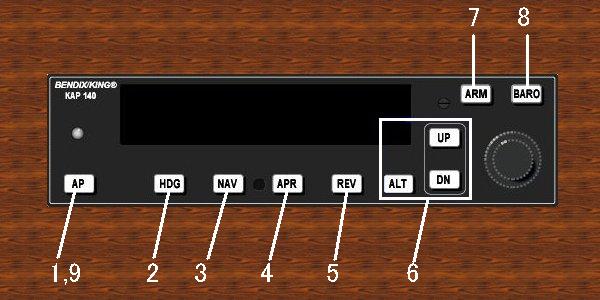
While setting up/testing all the AP switches for my (3d printed) Bendix Kap-140 AP, I 've encountered a problem...
When I'm in the sim,and I click the AP's "ALT" button (with my mouse! inscreen) , it will Toggle between ALT (ft light goes on,and I can enter the height by the encoder) ,
and VS (FPM !!!!/feet per minute) light goes on,and I can enter the "VS speed" with the "UP'+"DWN" button).

But where is this VS mode fpm setting or is there a turnaround??

Help/suggestions are highly appreciated,also tips for (LCD) diplaying notifications like "alert" like a popup or so?Even one capital A letter being displayed is cool:)


EDIT by Pizman: Insert the other double post....
As seen here in this picture (nr 6 and 7)
[Last edited by pizman82, 2022-08-17 20:30]
2022-08-16 21:10
Avatar
pizman82
Moderator
From: ETSI, Germany
Posts: 6010
Supporter
Hi

As always.... Its a question of AddOn.
You not tell us what Sim or Aircraft you use.
Every single Aircraft ( Specially AddOns) will have own Offsets/Variables.

Also not every system exist as a variable. Sometimes we need to bild it improvisional.

For example a Aleart LED if Aircraft climb above 20.000ft.
If these not exsit as a own variable then we could build it by create a config that read the current Altitude and simply say If >20000 then 1 else 0.
( I hope you understand).

In easy words... Tell us what aircraft and sim you use. Then advanced users of that aircraft can have a look.
AND.... Discord is mostly the better adress.
Here in Forum we solve technical stuff.... Aircraft related questions are better done on Discord !
Good Luck !
2022-08-17 20:29
Avatar
JJJM
From: Bergen op Zoom, Netherlands
Posts: 2
Thanks a lot for your reply!

By copy pasting I forgot to add the introductional section,sorry about that!

So Hi again:)

I'm using the MSFS (Deluxe version) cessna 172 (the non G1000 version),and have found the solution.(I did not know before about the HubHop presets:)

So if anybody found this problem ; HubHop is great!
2022-08-19 01:23
icon