MobiFlight Community Support

Welcome to the forum for MobiFlight! Feel free to reach out to the community in case you have questions, issues or just want to share great ideas or details about your latest home cockpit project.

You like MobiFlight? Donate via PayPal and support the MobiFlight development. Thanks! 

05/03/2024 - This forum is read-only

The community support for MobiFlight has moved exclusively over to our Discord server. Register for free and enjoy more interactive functions like image and video upload, voice chat. More than 7,000 registered users around the world make it a great experience!

See you on our MobiFlight Community Discord server.

A HUGE Thank You to everyone who participated in the forum, especially obviously to Pizman and Stephan who did an outstanding job over so many years providing an incredible service to the MobiFlight community.

The forum is still providing a lot of good content, hence we keep this information accessible.

icon
Avatar
StevenPilot62
Posts: 17
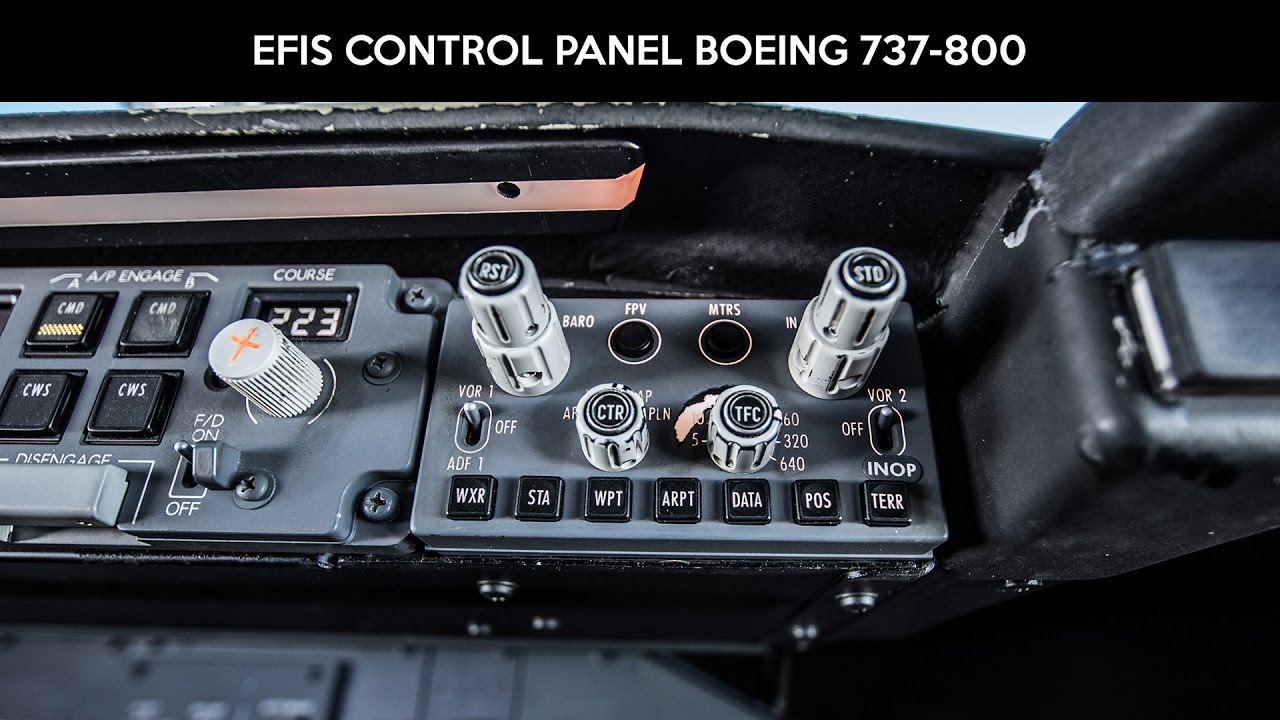
Hi any help welcome , i have connected the BARO encoder to change the barometric pressure , but i also want to create a precondition so that when i press the centre button i can either set the STD or switch between HPA or INS.


Regards
StevenPilot
2021-02-06 16:38
Avatar
pizman82
Moderator
From: ETSI, Germany
Posts: 6010
Supporter
In Theory lots of things are possible..... But you should explane me what exactly you like to do.

In Real this is a combination of 3 Elements.... The IN/HPA Element is a latching 2 Position Rotary Switch controlled by the OUTER Shaft. The smaller INNER shaft controll a Encoder ( Endless) to set the QNH..... And Finay there is a momentary Bush Button on Top that control the STD Setting.

Look here....


PMDG is a little uncomfortable to build things different as in real ( or better as in virtual cockpit) ..... So If this is a latching system there exist mostly no "toggle" Event additional.

**********
Your basic Problem.... You got only a single Encoder with a Push Button..... So 2 Input Systems but you like to controll 3 Things. Thats not realy possible.

What we can do easy....
Encoder Controll QNH .... Push Button Controll STD HPA/IN is ignorred.
OR
Push Button manage 2 different Modes of Encoder.... Mode 1 Encoder controll QNH ... Mode 2 Encoder Controll IN/HPA But here STD is ignored.

If you tell me exactly what should happen if you press the button and how this should work..... then i can try to figure out a config for you !
BUT
Basicly i recommend to use the correct Devices.... 3 Things need 3 Elements !
Good Luck !
2021-02-07 01:33
Avatar
StevenPilot62
Posts: 17
thanks for your response , i would like if you push the button this will go to STD


appreciated
Steven
2021-02-24 09:44
Avatar
pizman82
Moderator
From: ETSI, Germany
Posts: 6010
Supporter
This is no Problem....
Simply use Encoder for Inc/Dec QNH .... And Use Push button to controll the STD function.
Then the "switch" for IN/HPA is simply not included.

If you like to controll all 3 Elements there are tricky ways.
I would use the Encoder for this.... Means we would build a Double Config for it.... So the Encoder controll the QNH - OR - it controll the HPA/IN in case of a indication.

This indication now is the key.... Build it with the Push Button on Encoder make no sense.... Cause each Press would also execute the STD Command.

Way 1. Build it with a additional Button.... E.g. a Button next to the MTRS Button. If you press this button you toggle between two modes.... In Mode 1 the Encoders Controll QNH or Decission Altitude.... In Mode 2 it swap to HPA/IN or Radar/Baro.
Disadvantage.... You have a non realistix Button on your Panel.

Way 2. Use a other existing System (That is used not to offten and not make problems if you activate it without needness) .
For example the EFIS VOR/ADF Selector. ( 3 way switch right next of Encoders)
So we say.... If this Selector is in Mode VOR or ADF then your encoder will controll the QNH .... But if this Switch is in Middel (OFF) Position then the Encoder controll HPA/IN.

Thats also not realisitic.... But you not need a Additional Fake Button.... All Looks like real. And if you like to Change the not existing Switches of e.g. HPA/IN you just set temporary the VOR Switch to middle position for this action and you set it back if your input is done.

NOTE: This is just a example. You yould use every function for this.... E.g. The Mode of the Encoder is swap if you Activate the Wing Lights or if you enable the Non Smoking Lights.
Important is.... The Used Function should not occure in problems. So for example the Fire Bottle Switch is a bad choice cause ou will not kill your engines while flight if you need to swap the Encoder Mode. Means you should use a System that not realy care you if it´s ON or OFF for a short moment.
Good Luck !
2021-02-24 11:20
Avatar
StevenPilot62
Posts: 17
Thanks for your detailed explanation most appreciated
2021-02-25 21:28
icon