MobiFlight Community Support

Welcome to the forum for MobiFlight! Feel free to reach out to the community in case you have questions, issues or just want to share great ideas or details about your latest home cockpit project.

You like MobiFlight? Donate via PayPal and support the MobiFlight development. Thanks! 

05/03/2024 - This forum is read-only

The community support for MobiFlight has moved exclusively over to our Discord server. Register for free and enjoy more interactive functions like image and video upload, voice chat. More than 7,000 registered users around the world make it a great experience!

See you on our MobiFlight Community Discord server.

A HUGE Thank You to everyone who participated in the forum, especially obviously to Pizman and Stephan who did an outstanding job over so many years providing an incredible service to the MobiFlight community.

The forum is still providing a lot of good content, hence we keep this information accessible.

icon
Avatar
anthonym
Posts: 13
Greetings and Merry Christmas everyone.

I am starting work on my next project, the B737 electrical panel, and have come up with another learning opportunity, the MAX7219 IC chip and 7 segment display.
My plan is to custom wire 5 separate modules (1x2 digit and 4x3 digit) to two MAX7219 IC chips. But I have a couple of questions regarding the wiring of these chips and their configs with Mobiflight.

Question1: Do I have to daisy chain these chips together increasing a chance of signal loss and garbled data, but using only a single config in Mobiflight, or is it better, and possible to wire these chips individually to the MEGA and use a separate config for each chip, even if it means using 6 pins instead of 3?

Question2: Is it good practice and even required at all to use twisted pairs for the 5v and ground wires to eliminate unwanted noise? I plan to include two capacitors in the V+ circuit so do I need twisted pairs as well, or will the capacitors be fine by themselves?

If there is any links to articles and information on wiring these chips that would also be much appreciated.

Kind Regards
Anthony
2020-12-26 03:54
Avatar
pizman82
Moderator
From: ETSI, Germany
Posts: 6010
Supporter
Hi Anthony

At first.... You missunderstand the "Config" System here. Each Max7219 is a own Device. ( If you use a Chain all together are one Device in the List.... But technical also here each is a own single Device)
The CONFIGS are not related to the Full Max Chip! Means if you use e.g. Diggit 123 for DisplayA and Diggit 456 for DisplayB then normaly you NOT make one Config that handle all Diggits with one long Value..... Normaly you build 2 Configs In MF.... One for each Function/Display.
Technical its possible to combine things but this is not tidy and mostly more difficult.

So in Your case the most easy way is to build 5 Configs... One for each Display. Only if the Raw Value ( whatever Addon you use) is realy perfect then we could use a combination. For example in PMDG this is not the case. Here Single Configs are much more easy!

***********

About basic question:

If i understand right you talk about "wirework" and also about a "raw" Max7219 Chip. This is a bit confusing and normaly we not do this.

If you use a "raw" chip.... So only the IC then most people work with a own designed PCB .... Means all lines are done on this PCB ( and also solder holes for additional stuff like diodes, capacitors or resistors ). But here we not talk about "wires" cause mostly also the Diggits are then solder on that ( or another) PCB and you need no wires or just a FLAT Wire from one to the other PCB.
If you think about real wire systems.... So self solder without difficult designed PCB´s then using a raw IC is not verry practicable.
Here we recommend TUBES..... As most poeple use them.
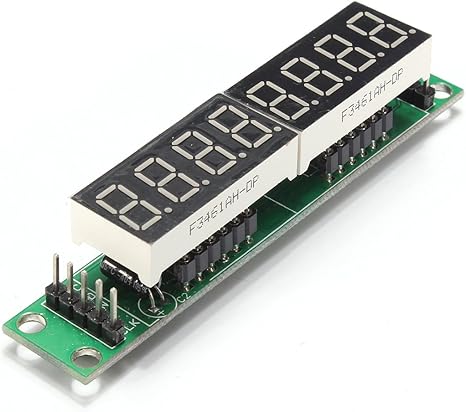
Like THIS.... https://images-na.ssl-images-amazon.com/images/I/61DMk3aL9mL._AC_SX466_.jpg

Those Tubes have the Max7219 Chip intigrated on there PCB.... All Lines and electrical stuff is premade. And you still got 2x5 Pins (left and right) to handle the connection to the Mega ( via 5 wires) and also the option to make a Chain or not.

NOTE: There exist 2 different Tubes.... The linked (with mostly a green PCB ) have removeable Diggits. Thats what we need. The others ( mostly blue or red) have the diggits solder. Those also works but you need much much more time and solder skills to handle them. Both should cost nearly the same money !

Now the System..... You buy a Tube and then you pull off the original Diggits. then you got 2x12 Pin-Connectors empty. These represent 2x4 Cathode Lines ( 1 for each of the 8 Diggits).... and 2x8 Segment Lines ( 7Seg+DP .... Shared on each side)
So this setup is perfect to handle two custom Displays ( for example 1x3 and 1x5 or 2x3 or any other combination) . If you need 3 Displays ( like you said one board should handle 2x3+1x2 here you just need to combine the Segment Lines from 2 Displays together ( cause you only have 2x8 Connectors on the tube).

Decide yourself if your intrested in this OR if you prefer your own IC system..... If you need, Stephan pretty sure can share his Picture guide to Build a MCP with those Max7219 Tubes. Contact him on Discord..... There he can also directly send the file.

*********

About Chains.....
Chains are possible. So Yes.... You will save 3 Pins. A Chain of 2 chips is working perfect. Just longer Chains ( with those Tubes specialy) need a little rework. Here you must wire the 5V directly to each Tube ..... Or you must desolder a Diode on that PCB. With own builds ( IC) there is no disadvantange and you can fully use x8 Chains !
Good Luck !
2020-12-26 15:24
Avatar
patEGWU
From: Northolt, United Kingdom
Posts: 9
Hi guys,
I am working on a flight panel that uses multiple Max7219 chips. As previously expressed by Anthonym two posts up, I also have concerns about data corruption within a chain of Max chips. I need a chain of 6 in one instance. In other, the distance between the two chips is almost 15 cm. I hear that Max7219 are very noise sensitive. Will using twisted or shielded pair improve anything? Should I use some between DINs and DOUTs or CLK and CS as well? What about Arduino to DIN? Which cables did you guys use?
Btw, I am using raw IC, not the modules. I learnt it is essential to place two capacitors across 5v and GND close to each Max7219. So imho I don't need any "better cable" here. Am I wrong? Currently using 24awg for all the Arduino connections and 22awg for 5v and GND.

As this is my first post I don't want to miss the opportunity to thank you guys for all the input here on the forum. I can't tell how many times looking things up here saved me a lot of time and allowed me to progress with my ever growing project. A Big Thank you!
2021-01-17 12:40
Avatar
pizman82
Moderator
From: ETSI, Germany
Posts: 6010
Supporter
There exist lots of reports with problems here.... But we can not see the Systems. So if a user report a problem ( and say he use long wires) we finaly not know if the length is the problem.... the Quality of the wires or simply his solder work.

Basicly i think we can say..... The most critical Point in Max-Displays is the solder work. If a line ( specialy 5v and GRD) get a millisecond of loosing connection then the initialisation is lost and you need to restart the Mega itself to "reboot" the MaxChips.
That means... Whatever you do.... Get sure all connections between wires and Elements are 100% perfect.

About Wires.... I have no official recomendation here.... I will say a wire with 3 Meters will not work. A wire with 10cm will work. So Rule is simply As long as absolutly needed and as short as possible. Quality.... Normaly all wires should work. Not use a 15 year old verrx thin cable from a other project.... But sure you also not need high priced special coverd wires..... If Distance is in "normal" dimensions the wire quality should not be a big factor. ( my opinion)

About Chains.... Some users ( Like Stephan) work with a 6 Chip Chain.... Others avoid chains in any way.... Technical they should work.... but sure.... In a longer chain there "can" be a risc of data coruption bigger then in a single Setup i think.

*********
Summary:
I recommend personaly..... think about your Project... And also about the future. Is this a standalone Box that never get upgraded ? OR is this a element you like to put into a bigger Cockpit ?.
If you will use another element directly next to it.... Then it is not needed to save Pins.... So you can build 3 Chains with 2 Display e.g. You can simply use 6 Pins of the other Mega.
Or why not use a additional Mega within this single Setup.... A Mega and a 2way Y-Conncetor for 2 USB cost you less then 10$ ....

So... If you realy get scarred about the Chains.... Use a second Mega and avoid them.
Good Luck !
2021-01-18 00:25
Avatar
patEGWU
From: Northolt, United Kingdom
Posts: 9
Thank you for you answer, Pizman82. I really appreciate your input.
I'm already working with 3 Megas for Mobiflight and 1 Leonardo (as a joystick, for throttle and mixture axis only), so I am both running out of space in the project enclosure that I made and usb ports on hub inside it haha. I guess I will try to rethink and swap some things between Megas to avoid longer chains of Max7219 and buying more stuff. At least for now.


Stay safe
2021-01-19 11:08
Avatar
pizman82
Moderator
From: ETSI, Germany
Posts: 6010
Supporter
To give you finaly a little piece of inspiration.....
Check the Videos from Karl ( Helimech) One of our most advanced users.

For example the Pedestal.... Interesting Display Situation is from Min 20 and above i think.
https://www.youtube.com/watch?v=oPKrnKUcAxc
(Also check the other Videos from Karl..... He give many inspiration to all of us )

There you see he work with a "Bay" System....
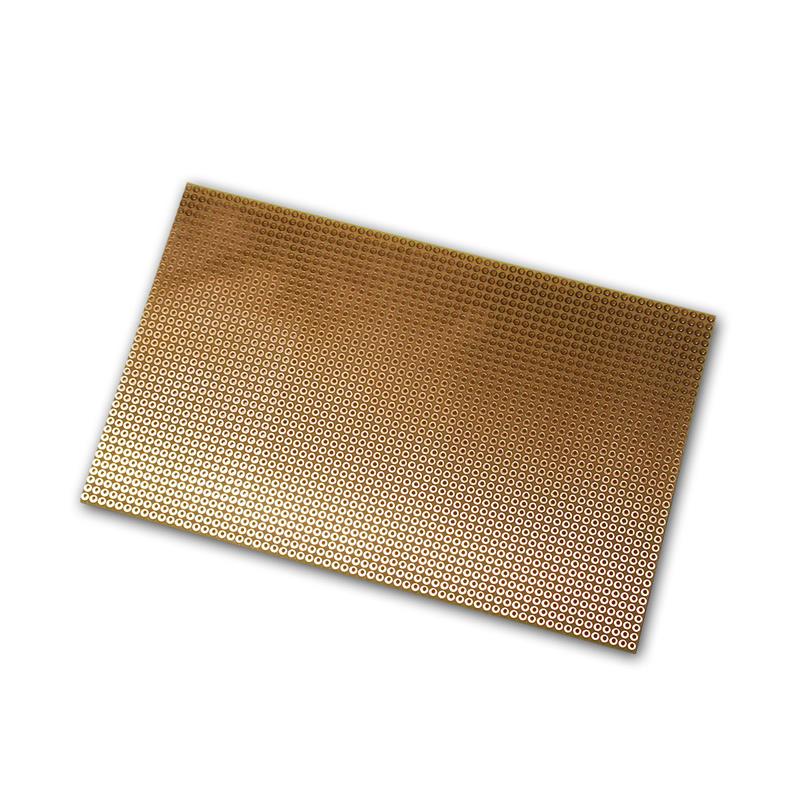
Means all Displays are solder on a empty Breadboard like this ... https://media.highlight-led.de/products/images/10607.jpg
All "lines" are build on this platines (he use wires mostly) Then he use Male/Female Flat Connectors for the Connection between the elements itself.
The Max Chips also are cominated on one spot.... And are solder on a Breadboard... so all the Lines are tidy solder there.
Finaly he got connectors ( Input) where he set the income Wires from the Display and a Output Connector that goes to the Mega.

In easy words.... Each Part.... The Display Board, The Max Tubes and also the Mega have "Pull-off" connections and can be removed if needed...BUT all Connections finaly heva a perfect solder contact to the wires.

Also check these systems for the Mega....
https://www.youtube.com/watch?v=Tb0aASFMn_w (Screw terminals)
https://www.youtube.com/watch?v=HjqLomkcnOg (Solder Point connectors)

Also here we got the advatage that we can solder or screw the wires perfectly.... But we can still remove the Mega within 5 seconds by pull it off the bridge !
Good Luck !
2021-01-19 12:53
Avatar
patEGWU
From: Northolt, United Kingdom
Posts: 9
Hi Pizman82,
Thank you for taking time to response and your advice!

I know about Helimech, I am pretty sure it was thanks to his videos I found out about Mobiflight and could finally drop Link2FS (which went from easy to beyond my skills very quickly). I admire his skills and his sim is absolutely awesome, I hope he shares more videos of it! I am amazed how much thought he puts into the setup, and how neat and accurate it all is. I actually got a couple of solutions from the very video you linked, as I watched it maybe a month ago. Indeed an inspiration, thank you Karl! I could not apply his modular design exactly (very limited space here), but took some ideas from it when soldering my display concoction. If you care to see it, it's https://imgur.com/gallery/xF5pnOC here. Very crude, and very unfinished. Aaaaanyway.

I am already using Mega shields, I have the green ones (cheapest?) with terminals, on each Mega. They are a game changer to be honest. I am waiting for another reel of cable to come in the post, as my first 100m was gone within a couple of days and when I'm done soldering I will report back if I got the displays to work properly.

Thank you again Pizman82!

Stay safe
2021-01-21 16:37
Avatar
anthonym
Posts: 13
Greetings all
After what seems like an eternity planning, designing and constructing the layout of my next project console using the led segments, I have re-visited my original post (as I am getting to the pointy end of the build, the wiring), and saw that one of my concerns regarding the quality of wires needed and the advice regarding the use of twisted pair wiring was answered. Thank you pizman82 and patEGWU.

I have a further question, and it's probably going to be a really stupid question.....but....for the output pins I am using for the led segments, is there any difference in using the analogue pins over the digital pins or vice-versa? Does it even matter what pins I use?

For that matter, generally speaking is there a pin better suited for an application, especially if all I want to do is output an led or input a switch? My previous console build using 5 Mega boards is working perfectly but maybe I could have connected it more efficiently.

Any feedback is welcome.

Regards
anthonym

Stupid Question Score: /10 :)
2021-01-30 14:58
Avatar
pizman82
Moderator
From: ETSI, Germany
Posts: 6010
Supporter
No.

As i understand Sebastian implement the Analog Pins last Year in a basic way...... So Simple Bool IO Pins. ( Same like the Digital ones)

We not test everything in all possible combinations..... But im sure Switches should be fully working without any difference on both Pin Typs.
LED Should also work..... But i remember there is a power problem if you use all 16 Analog Pins for LED...... Not sure if this is solved meanwhile.

Only Motors and 7Seg Displays are "maybe" problematic..... Here i would recommend to use the DigitalPins 2-53 .... In theory they also should work on Analog Pins but we not tryout ourself.
Good Luck !
2021-01-31 16:06
Avatar
anthonym
Posts: 13
Ahh ok.
With this information in mind I will need to move some pin allocations around so I am using digital pins for my 7 segment displays. I will also need to move some of my led's from the analogue pins to digital ones so I don't run into any power issues.
Time to wire this up.

Many thanks for your advice.
anthonym
2021-02-01 07:06
Avatar
pizman82
Moderator
From: ETSI, Germany
Posts: 6010
Supporter
Again.... As written above i just not test it.... Means i just can not confirm it work..... But in theroy it should.
So before you plan a lot of working time to reorder the pins.... why not simply test it in your current setup.
If there are no issues or power problems then all is fine already.
Good Luck !
2021-02-01 11:23
Avatar
anthonym
Posts: 13
That's ok. I have not physically wired up any pins yet so an adjustment is not going to cause too much of a problem. Especially if it means there is less chance of problems later on.
However with my setup and custom circuit wiring I have designed I should be able to change what pins the 7 segment displays are physically connected to easily, so I could do a little test of my own to see if the 7 segment displays operate correctly using the analogue pins and report back. That would still be a few months away, it but might be worth it to at least give feedback to the community. Just a thought.

Always grateful for advice given.
anthonym
2021-02-02 07:16
Avatar
SergeyPe
Posts: 45
A general note on 7219 use. I've just finished a 737 MCP for a friend with 6 pieces of 7219's daisy-chained along the length of the panel (about 470 mm). No twisted pairs, no special care about the wires' layout, the power/ ground are daisy-chained as well (I don't have the diodes on the 7219 PCB's). Everything works like a charm...
https://yadi.sk/i/nruxygd_myn3jQ
https://yadi.sk/i/3l5Wi6ugjKGa5g
I haven't tried the analog ports for the LED outputs, however. Used the digital ones for all the indication with a couple of analog ones used for the switches.
2021-02-02 08:35
Avatar
ThingWizard
Posts: 2
I agree with this assessment. I have been struggling to get my MAX7219 displays working for two days now, but I finally succeeded. The key seems to be using good power cables, checking all solder joints, especially the bridges between the MAX7219 chips, and using a stable external 5V power supply. I use old Ethernet twisted pair cables for the data cables, mostly because they are easy to route. I am running two chains, one with two MAX7219 chips and one with three. (This is for a 3D-printed Boeing 737 MCP from 737diysim.) I have gotten my setup so stable now that I think I could run all five units in one chain, but I am content with using six outputs. (I haven't wired up all of the buttons yet.)

I ran the test mode at the highest speeds overnight and experienced no corruption whatsoever.

Bottom line: When using MAX7219 displays, CHECK YOUR POWER AND GROUND CONNECTIONS! Any corruption is most likely coming from the power side, not the data side. Once you have verified that the power is stable, check the bridging connections.

Good luck!
2023-09-30 07:30
icon