MobiFlight Community Support

Welcome to the forum for MobiFlight! Feel free to reach out to the community in case you have questions, issues or just want to share great ideas or details about your latest home cockpit project.

You like MobiFlight? Donate via PayPal and support the MobiFlight development. Thanks! 

05/03/2024 - This forum is read-only

The community support for MobiFlight has moved exclusively over to our Discord server. Register for free and enjoy more interactive functions like image and video upload, voice chat. More than 7,000 registered users around the world make it a great experience!

See you on our MobiFlight Community Discord server.

A HUGE Thank You to everyone who participated in the forum, especially obviously to Pizman and Stephan who did an outstanding job over so many years providing an incredible service to the MobiFlight community.

The forum is still providing a lot of good content, hence we keep this information accessible.

icon
Avatar
munga
Posts: 10
Hi,

I need help with 3 purchased 7-segment display leds from my local electronic store...
I cannot find database sheet for these 7 segment displays....

this is where I need help in the forum community...

On the side of the LED its showing ASD-052CI, but when i try to google this, I am not getting much feedback.

I really need help from the forum community with this...

Many thks
2020-10-31 04:17
Avatar
StephanHo
Moderator
From: EDDG, Germany
Posts: 1867
Supporter
Hi munga,

welcome to MobiFlight!

If I search google with led 7 segment ASD-052CI I got 27.300 results.

Because the displays have a common cathode it is possible to drive them with MAX7219 and MobiFlight
Grüße,
Stephan (Time: UTC+2)
2020-10-31 13:34
Avatar
munga
Posts: 10
Many thks Stephen:w00t:

:) I am happy to know they will work with the MAX7219 chip....

I am going watch a lot of Ytube, in how to construct a AP heading display{ I have the Rotary encorder working on the heading bug, but I've never done a 7 segment display}

Marco
2020-11-01 00:12
Avatar
munga
Posts: 10
Unfortunately...these 7 segment I had purchased failed......:cry:

However...I am looking at the following 7-segment for my AP Heading Display {msfs 2020} BRAND: LT0565GWK {7 Segment LED Display, Green, 20 mA, 2.2 V, 2.3 mcd, 3, 14.2 mm}
URL: http://www.farnell.com/datasheets/2863915.pdf

I am very limited to electronics, but i would like to know if this 7-segment display {as per above} will work with MAX7219, plus I need to know what resistor or capacitor will work on the Arduino Mega....

Your help from the form community will much appreciated!!!!
2020-11-10 04:11
Avatar
StephanHo
Moderator
From: EDDG, Germany
Posts: 1867
Supporter
Hi munga,

this display should work. But you can max. connect 8 digits to a MAX7219. If you need more than 3 digits you have to connect the segments parallel from display to display and to connect the cathodes separatly like in the datasheet.

For which purpose do you need a resistor or a capacitor in this schematic?
Grüße,
Stephan (Time: UTC+2)
2020-11-10 19:42
Avatar
munga
Posts: 10
Hi Stephan

many thks in replying.....Current I have 3 x individual 7-segment displays{com/cath} connected to the MAX7219 in parallel.

Where I am struggling to understand or can I say confusion!!! is what type of resistor is required for the ISET connection {47k or 9.53K ohms} as per Max datasheet.:confused:

plus, according to many Y tube's I have seen, is where they place a 1 x 100mf and 1 x 10nf Cap as well...:confused:

These 3 x 7segments display have two common pins, but because I have no datasheet, I don't know which common is positive or negative...I know 1 lot of the common pins are required for D0,D1 and D2, but what do I do with the other common pins from the LED Displays???

I am running an Arduino mega with a USB connection.

Once again Stephan, I do apologies for my lack of electrical understandings...7-segments is very challenging for me

Marco
2020-11-10 22:55
Avatar
pizman82
Moderator
From: ETSI, Germany
Posts: 6010
Supporter
Hi

You confusing me.

You say Your Displays got 2 Common Pins.... But they should have 3 Pins .... Your Links show Pin 12, 9 and 8 are the common Cathodes.

Do i understand you NOW talk about Single Diggits ?? If Yes... Those mostly have 2 Common Cathode Pins but both are paralell.

Those Displays normaly build to have the same number of Pins in each of the two rows.
A Singe Diggit got 7 Segments + 1 Decimal Point + 1 Common Cathode.... So 9 Pins. To make it even they build mostly 10 Pins.... so you gut finaly 2 Cathodes. But both are the same !

Note: A Common Cathode Display will NEVER have a Anode Pin !

About Resistors..... Do you use the Raw Chip ? Do you work with own build PCB?

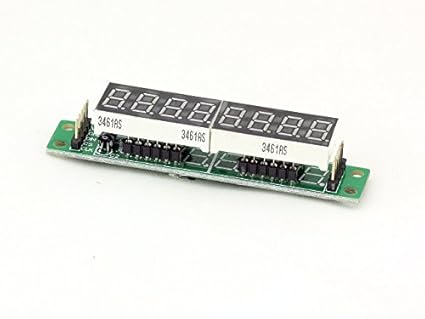
Most cockpitbuilders simply use Max7219 TUBES.... Like This.


Here all Resistors and lines are still done.... You just remove the 2x4 Blocks and wire your Displays to the now empty Pin Connectors.
Good Luck !
2020-11-11 20:11
Avatar
munga
Posts: 10
pizman82,

Yes ....I have 3 individual Common Cath displays....they are all connected to the MAX7219 chip.....

The common pins are connected to their respected DIG's on the max Chip....Because I have 3 digit displays, the common pins are layered out in order D0,D1 and D2.

The 3 LED displays are all connected with jump wires on a breadboard.

I do not understand when you say raw chip??? what do you mean on this!!!:huh:

Yes I am aware of the Max7219 TUBES, but this component does fit to my project.....{i can use this later on}

Marco
2020-11-11 23:56
Avatar
pizman82
Moderator
From: ETSI, Germany
Posts: 6010
Supporter
with "raw" Chip i mean just the chip.... like this..... https://www.amazon.de/max7219cng-MAX7219-dip-24-Treiber-Display-8dgt-Qualit%C3%A4t/dp/B07216LGTS

If you use this then yes... you need al the resistor stuff and electrical components.
If you use a "Tube" like i showed above then all this "work" is still done by the manifactur. In that case you just need to wire the 5 main lines ( 5v GRD and CS CLK and DIN) from Mega to the "Tube" ..... And You remove the stock Displays and finaly wire your displays ( Whatever 1 diggit 3 diggit 7 diggit or so on) to the free connectors.

In easy words.... If you plan for a own designed PCB then its more usefull to solder the "raw" chip on it.... Also the electrical parts like resistors.... and finaly the Diggits ( all 1x1 singles) also on that PCB..... All wires are done by lines on the PCB.

If you plan without a difficult PCB then its more confortable to use "Tubes".... Here you not must handle the Max Chip.... You chust build a wire with 2 connectors and set it to your display and also to the Max Tube.
Good Luck !
2020-11-12 01:31
Avatar
munga
Posts: 10
pizman82,

Yes....this was my second option....is to hard wire the segments {solder} with better wires {not jump wires} and each letter pin with 220ohm resistors leading to the MAX CHIP SEG letters on the Breadboard.

I know the Tube will be a better option, but I am limited to space as I have buttons and switches as well working excellent.

Marco
2020-11-12 02:48
Avatar
pizman82
Moderator
From: ETSI, Germany
Posts: 6010
Supporter
You already missunderstand..... If you use a Dispay ( Whatever 1 diggit, 3 diggit or more) ...... You not need Resistors for each Segment line.
the MAx7219 output already a verry low current power on it´s output.

So it´s no difference if you work with a tube or with a chip..... The only resistor needed is the INPUT resistor of the whole Max Chip..... This is already included with Tubes but missing if you use the chip "standalone".

I recommend to watch videos of Helimech..... For example watch this video from Min 21.40 to 36.00 https://www.youtube.com/watch?v=oPKrnKUcAxc
Then you understand what i mean and how most cockpitbuidlers handle the displays !
Good Luck !
2020-11-12 03:14
Avatar
munga
Posts: 10
pizman82,

My led display is now working correctly......I had decided to not use the jump wires, but rewired with better cables.......

Once rewired, the LED Display worked and working very well on FS2020...

Happy as Larry!!!!!:w00t: :w00t: :w00t:
2020-11-13 10:14
icon