MobiFlight Community Support

Welcome to the forum for MobiFlight! Feel free to reach out to the community in case you have questions, issues or just want to share great ideas or details about your latest home cockpit project.

You like MobiFlight? Donate via PayPal and support the MobiFlight development. Thanks! 

05/03/2024 - This forum is read-only

The community support for MobiFlight has moved exclusively over to our Discord server. Register for free and enjoy more interactive functions like image and video upload, voice chat. More than 7,000 registered users around the world make it a great experience!

See you on our MobiFlight Community Discord server.

A HUGE Thank You to everyone who participated in the forum, especially obviously to Pizman and Stephan who did an outstanding job over so many years providing an incredible service to the MobiFlight community.

The forum is still providing a lot of good content, hence we keep this information accessible.

icon
Avatar
dlaque1
From: warwick, United States
Posts: 7
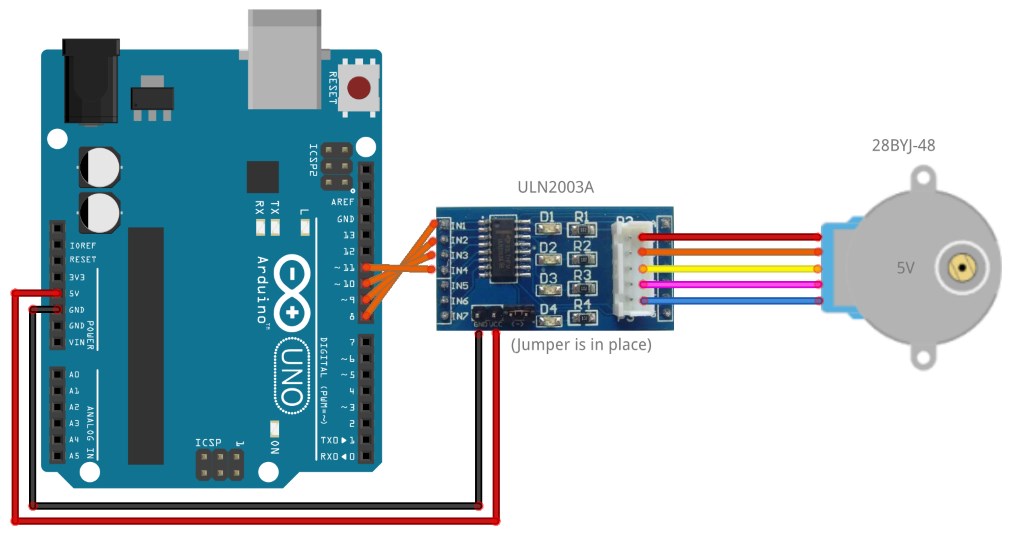
Does anyone have a pic or drawing on how to wire a stepper motor in my wet compass to my mega ???
2019-07-06 14:55
Avatar
pizman82
Moderator
From: ETSI, Germany
Posts: 6010
Supporter
Simply google....
https://surtrtech.files.wordpress.com/2018/01/3e681-azaz.png?w=1360
or
https://coeleveld.com/wp-content/uploads/2016/10/Arduino_Stepper_ULN2003A_28BYJ-48-1.jpg

If you got a standard Stepper with ULN2003 Controllerboard then all should be clear.

4 Data Lines to 4 Pins ( Choose them in the Device Setting Tab) .... 5v and GRD to the ULN ..... And the ULN to Motor Block like explaned in the Motor Manual.

Setting in Mobiflight is also self explaned.... You define ONE TIME the Zero Point of your Motor ( with the 1/10 Left right Buttons)
In the Other fields you define Number of Steps (Stepper field) .... Normaly 2048 .... For some Steppers here 1024 or 4096 is correct.
In the "SIM" Field you define the Range of Offset Value that is used for 1 Turning of Motor.... In Your case 360 or maby 3600 whatever your Raw value workes.

Finaly remember to activate "Compass Mode" in the FSUIPC Tab of your Config. All Gauges that turn over within one range ( compass, Heading, Navaids, 100ft Altimeter needles) must use Compass Mode !
Good Luck !
2019-07-06 15:32
Avatar
dlaque1
From: warwick, United States
Posts: 7
THAT WORKED PERFECT !!!! Thank you very much :)
2019-07-07 18:04
icon