MobiFlight Community Support

Welcome to the forum for MobiFlight! Feel free to reach out to the community in case you have questions, issues or just want to share great ideas or details about your latest home cockpit project.

You like MobiFlight? Donate via PayPal and support the MobiFlight development. Thanks! 

05/03/2024 - This forum is read-only

The community support for MobiFlight has moved exclusively over to our Discord server. Register for free and enjoy more interactive functions like image and video upload, voice chat. More than 7,000 registered users around the world make it a great experience!

See you on our MobiFlight Community Discord server.

A HUGE Thank You to everyone who participated in the forum, especially obviously to Pizman and Stephan who did an outstanding job over so many years providing an incredible service to the MobiFlight community.

The forum is still providing a lot of good content, hence we keep this information accessible.

Go to page 1Go to page 112Go to page 3Go to page 2
Avatar
propeller
Posts: 4
Good morning to all, sorry in advance for my english. I started to build, thanks to this fantastic software, a homecockpit for 737 without spending thousands of euros. I tested the solution of this post and I concluded that it is possible to drive only 8 LEDs for each MAX7219. I begin to explain.
I had planned to use 4 LEDs for each digit using the characters "-", "_", "1" and ".", (This is to try to use only one Arduino board for MCP, one for EFIS, 2 / 3 for the pedestal, etc.) but when I have done the tests the LEDs concerned turn on flashing. Instead using only one LED for each digit works all regularly. Would it be possible to avoid this by using preconditions?
The current solution, for me, is to use 2 MAX 7219 for 16 LEDs with three arduino pins, but it would be great to be able to use only 1 MAX7219.
Greetings

Salvo
2018-10-13 13:18
Avatar
pizman82
Moderator
From: ETSI, Germany
Posts: 6010
Supporter
Hi.
Basicly Yes.
But again... I Not understand the intention of you and all the guys who request this. Maby you can explane me that !

As i wrote in last Posting.... It is basicly possible to controll 8 LED with ONE Max7219.
So it is also possible to usel 8x MAX7219 in Chain.... So You can controll 64 LED with 8 MaxChips in Chain by using just summary 3 Pins on the Mega.

iconQuote:

The current solution, for me, is to use 2 MAX 7219 for 16 LEDs with three arduino pins, but it would be great to be able to use only 1 MAX7219.


:scared: .. Why ?? Do you realy want to save 1,99 US$ for this one Max7219 Tube here ?

Basicly i would simply use 1 LED = 1 Pin logic cause its the most easy and tidy system....
And Okay... Using 16 LED with 3 Pins ( 2 Maxchips in a row) like you is also Ok and you save 13 Pins on the Mega. ( And maby the need of a additional Mega in the whole MCP)

BUT NOW...... What benefit is it to do this system with ONE instead of TWO MAX Chips ?? Saving this 2 Dollars or WHY do you think about that.
You need also 3 Pins on Mega.... You need more difficult Configs... You got more difficult wire works ...
I simply can not understand this
Good Luck !
2018-10-13 22:19
Avatar
propeller
Posts: 4
Thank you for your kind and quick reply. Do you really think that with my questions I try to save € 2? Really really? As I wrote in the previous post, I found the solution: use two MAX7219, and so far everything is fine. I purchased this item for MCP:
https://www.amazon.it/gp/product/B079HVW652/ref=oh_aui_detailpage_o07_s00?ie=UTF8&psc=1
I could buy the individual pcb and then weld them together, but why if I can have the same thing ready? In fact, the LED matrix I removed them and I will replace them with the 7 segment displays as soon as they arrive.
So the last max7219 I thought to use it for the LEDs of the buttons, I already did the tests and 8 LEDs (one for each digit) work, instead two LEDs for each digit does not work well, but I do not understand why it should be a problem money if I wanted to use all the possibilities of max7219 instead of just the eighth part :blink: .
To give you an example, if you buy a pizza (I love pizza, but this has nothing to do :D ), cut into 8 slices, what do you do, eat a slice and the other in the trash or try to eat all 8? :confused: :confused: :confused: Now you know how I like to work (and eat pizza :P ). And to you? At the slightest problem what do you do, you try to solve it or it add useless electronic components? :O
Even I simply can not understand it. As I do not understand if every problem must necessarily have to do with money. :O
So, I ask you again, do you really think it's a question of money?
I forgot, always excuse my English by Google Translate :lol:
Saluti
Salvo
2018-10-14 01:04
Avatar
pizman82
Moderator
From: ETSI, Germany
Posts: 6010
Supporter
I don´t think your fact was the money.... But this was the only logical for me.


by the way..... The linked Page show me a 4 Max Chip Row.... With 4 (64LED) Matrix Boards.
With this element you can controll already 32 LED ( 4x8) via 3 Pins.
I´m a bit confused why you talk about 2 MaxChips and only 16 LED in that example and show me this link !

***
About your arguments ...
At first... the Pizza example was nice... i agree here ! B)
And i will say Thank you for this nice discussion. I was realy interested to learn about your intentions !

so I fully understand you.... But let me say. When you startup to build a cockpit the factor "time", "tidy" and "easy logics" will be also important.

If you make "Your" System with current Mobiflight Software then 2 Outputs will always need 6 configuarations .
Also Up to 128 LED will ALL use ONE Device ( The Max Chain) .
So you can not see in Connector Main Window ( target device) WHAT Led is currently in Use by this config .... To find out you must check the used Maxchain-Number and active Diggit and you must check the precondition what Segment (A or B ) is in use. This "research" must be done with multible configs maby. Realy horrable if you got a little problem in a Output and you can not see in one look WHERE the Problem is located!
If there is a hardware Issue in a Maxchip then up to 128 LED will mess same time or show stupid things.., some are ON some are OFF.
finaly you can not use the "TEST" Function in MF .... Finding a Broke LED is nearly impossible here.

****
Another Example i say muitiple times here to show you "my" kind of thinking....
If you need 7 Segment Displays (e.g. MCP Alt, HDG and so on) ...... For eaxample 2x3 diggits and 1x 2 diggit..... summary 8 Diggits.
Most users will set them to ONE MaxTube and work with all 8 Diggits.
Myself i would use 3 Max tubes here.... and that 3 not in Chain... i would use them each single.
Sure in that way i throw 16 possible Diggits in the Trash and i need 9 Pins on Mega instead of 3 )

But please check the benefits.
-Every Display got its own clear device and can be named logical. (Not xx Displays share one device)
-Every Max must just calculate ONE Data No shifting no resetting of 3 different parts aslong no new data arrive.
-You have a Perfect way to find Issues.... if Display A not work then the Max of Display A have a problem or the wires from this line are broke... or the SINGLE config is wrong !
- You have a 100% Logical wire work... Display A TO MaxA To Pin 123 .... Display B to Max B to Pin 456 and so on. And EVERY Max got its own Power manegment !
- You can work with standard connectors you build and design ONE Time for all your Displays... Cause you use always a Empty identical Max Tube and never a Tube where something is already set from a other Display. So whatever you have 1,2,3,4,5,6,7,8 Diggit Displays.... all 8 Connectors can be mount ALWAYS in same way to the MaxTube.
- You need never a software logic to split something or to improvisional things to work over multiple tubes.

Sumamry...
Everbody will build the cockpit own style... My way is not better or less good then your way !
But i think you can already understand my logic and my arguments. For me the comfort, and tidy components are more important then a effectiv usage of Pins , possible diggits or save one MEGA.

Thanks again for reading and for nice discussion.
Good Luck !
2018-10-14 05:01
Avatar
propeller
Posts: 4
Good afternoon and happy Sunday Pizman82. You're right, maybe I was not clear, but unfortunately English is not my language, it helps me (I do everything to him) with Google translate. I start by saying that before starting to write here I have read many posts of this and other forums, in fact I have no problems with the hardware, for the moment. Write "When you start building a cockpit the factor" time "," order "and" easy logic "will also be important". I replaced the word "time" with the word "good", time is not in my priorities . My grandfather has always said that hurry is a bad advisor. :P
I also bought this object, for the prototype and for the experiments, just to do something neat and easy, so that when the work is finished I just have to connect the flat cable to the arduino and to the pcb of the separate components, input components (switches, encoders, etc.) and output components (display, led, etc.):
https://www.amazon.it/gp/product/B076S3XTSJ/ref=oh_aui_detailpage_o07_s00?ie=UTF8&psc=1
(I love do-it-yourself, so I planned to buy also a 3D printer to get double-light keys and everything I can use for mcp and efis :w00t: ).
As I wrote in the previous post, I bought the pcb with 4 max7219 board to be able to use the first 3 boards with the 7 segments display and the last with the LEDs of the buttons (at the time the problems you described with the chains of max7219 I not had them. If I has the problems you said, I can always do as you suggested, a MAX7219 for each 7 segments display :rolleyes: )
Using the idea that also DeltaBravo had, hoping it would work, but it does not go because I get the LEDs that blink if I use more than one LED for each digit (but I still hope we can do :P ). I can add another max7219, I can add another 4, but I do not have the order and ease of the connections I had programmed. I hope to be able to send some photos soon (as soon as I can get everything and start the "hard work"), in order to have yours opinion, criticism and suggestions about my project. Advices is always welcome!
I hope I managed to explain, despite Google Translate.
Thanks again for your answers
Salvo
2018-10-14 15:37
Avatar
pizman82
Moderator
From: ETSI, Germany
Posts: 6010
Supporter
Nice !

To help you with your blinking Problem.....

I not see your system.... So i assum taht your electrical Setup is correct !
So Problem must be located in your configs !

Example : ( By the way ... After rethink i see AlfaBravos example could finaly not work cause he use wrong numbers)

You have Diggit 1 of your Last Max Chip....
And you like to controll TWO LED with it. For example LED1 should be the VNAV Status light and the Second should be the LNAV Status Light.
You wire the first LED to the SEG B Line ( Upper Right) and you wire the second LED to the SEG E Line ( Lower left)
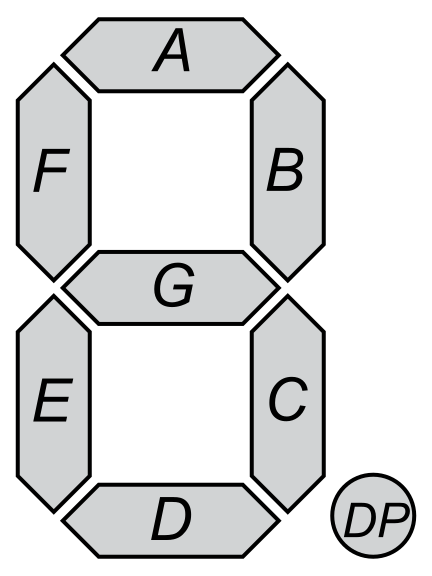
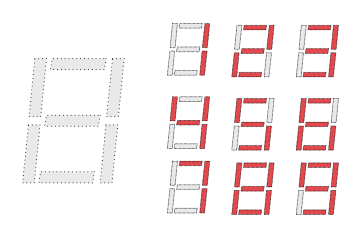

If you see the Picture you know....
If our Display will show a "1" then the SEG B (Right) is lighted.... the other is OFF at the moment.
If it show a "6" then the SEG E (Left) is ligthed and this time the other is OFF
If it show a "5" then NO Segment of the 2 specific is lighted (Blank )
if it show a "8" then BOTH Segments are lighted.
(Sure there are other combinations, too. I just use this. Whatever AlfaBravos 1,2,8 will not work cause you see in "2" both Segments are light and not only the second)

Now i think you did a issue.
You pretty sure create 2 Configs....
1. Config Read VNAV and controll the Diggit we use for this two led´s.
In Compare you say "IF Value = 1 THEN set to 1 ELSE set to 5 " ( That mean if ON then show "1" and Light Upper Right segment only ... If OFF then show 5 and NOT Light this element. )

2. Config Read LNAV and controll also the SAME Diggit
Here you say in Compare " IF Value =1 THEN set to 6 ELSE set to 5 ( That mean if ON then show "6" and Light lower Left segement only.... If Off then show 5 and not light it.

And here is the Problem....
If Both are OFF then you have no problem cause both Configs write "5" to it and all is fine ( No double command that time)....
But if one of both is ON then your LED start to flicker..... Cause now for example C1 send "1" and C2 send "5" ... C2 try to set SEG B to OFF same time C1 try to set SEG B to ON.
Same happen if BOTH Led should be on.... C1 send 1 C2 send 6 ... So each segment is light by one config but same time try to put Off by the other (and reversed)

To Solve this you need a Precondition system....
Target is....
There should be in all situations ( ON-ON , ON-OFF , OFF-ON and OFF-OFF) ALWAYS only one config active OR more configs but they must be show the SAME thing that time.
To make this possible you need:
C1 Read the Status of Function A ( LNAV) ( No Device... This is just for calcualtion)
C2 Read the Status of Function B (VNAV) ( No Device... This is just for calcualtion)

C3 Controll the "A Only" Situation . Transform here is "1" So Only Upper Right Segment is light.
Here you need Precondition Only work if C1=1 AND C2=0

C4 Controll the "B Only" Situation . Transform here is "6" So only Lower left Segment is light
Here you need Precondition Only work if C1=0 AND C2=1

C5 Controll the "Both OFF" situation. Transform here is "5" So NO Segment is light of the both we use
Here you need Precondition Only work if C1=0 AND C2=0

C6 Controll the "Both ON" situation. Transform here is "8" So BOTH Segment are light.
Here you need Precondition Only work if C1=1 AND C2=1

If you like to also include Lighttest or battery off status then you need 2 Additional Preconditions on each Config.

*****

Summary you see.... it is possible. But as i said. This is not realy a perfect solution. It takes a lot of work to implement. And finaly Mobiflight must calculate 3-4 times more stuff. I don´t know if this is maby a problem if you use it with 100+ LED.. Maby then MF getting slow in case of this unneeded additional CPU work !
Good Luck !
2018-10-15 07:11
Avatar
propeller
Posts: 4
Great! This way it works! But mobiflight becomes very slow. Between pressing the key and displaying in the output value box, pass 1 or 2 seconds. Instead if you use 1 LED for each digit the display is immediate. :cry:
Thank you so much for your suggestion, but for now, the best solution unfortunately is to use a LED for each digit. Maybe someday... :blush:

Greetings
Salvo
2018-10-20 14:49
Go to page 1Go to page 112Go to page 3Go to page 2
